ASUS P5N-E SLI 2-33
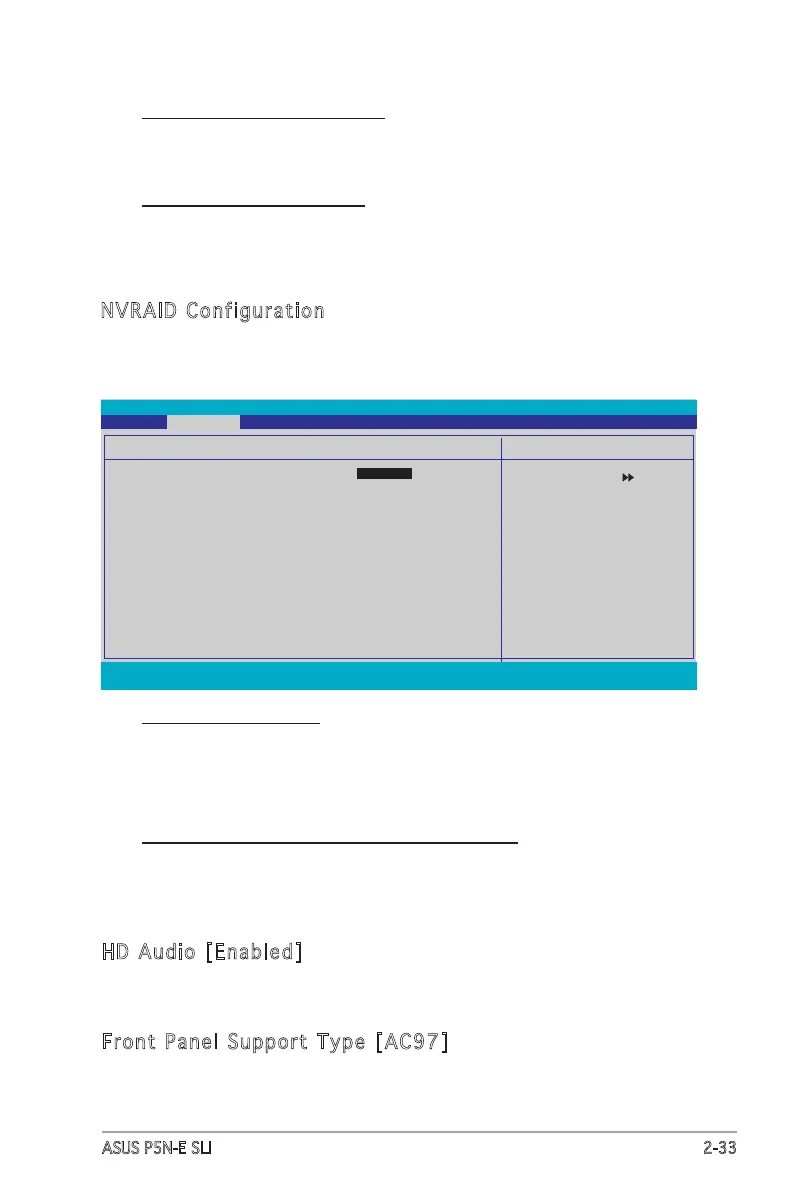
NVRAID Configuration
This sub-menu contains NVRAID function-related items. Select an item then
press <Enter> to edit.
F1:Help
↑↓
: Select Item -/+: Change Value F5: Setup Defaults
ESC: Exit
→←
: Select Menu Enter: Select Sub-menu F10: Save and Exit
Select Menu
Item Specic Help
Disable/Enable NVIDIA
RAID feature.
Phoenix-Award BIOS CMOS Setup Utility
Advanced
NVRAID Conguration
RAID Enable [Disabled]
x SATA1 RAID Disabled
x SATA2 RAID Disabled
x SATA3 RAID Disabled
x SATA4 RAID Disabled
SATA2 DMA transfer [Enabled]
Allows you to enable or disable the SATA2 DMA transfer access.
Conguration options: [Enabled] [Disabled]
IDE Prefetch Mode [Enabled]
Allows you to enable or disable the IDE prefetch mode.
Conguration options: [Disabled] [Enabled]
RAID Enable [Disabled]
Enables or disables the onboard RAID controller. When set to
[Enabled], the succeeding items becomes user-congurable.
Conguration options: [Disabled] [Enabled]
SATA1, SATA2, SATA3, SATA4 RAID [Disabled]
Enables or disables the RAID function of the SATA1, SATA2, SATA3 or
SATA4 master drive. Conguration options: [Disabled] [Enabled]
HD Audio [Enabled]
Allows you to disable or enabled the onboard HD audio controller.
Conguration options: [Disabled] [Enabled]
Front Panel Support Type [AC97]
Allows you to select the Front Panel Type AC97 or HD Audio.
Conguration options: [AC97] [HD Audio]








 To Next Page