ASUS P8B-E/4L 5-17
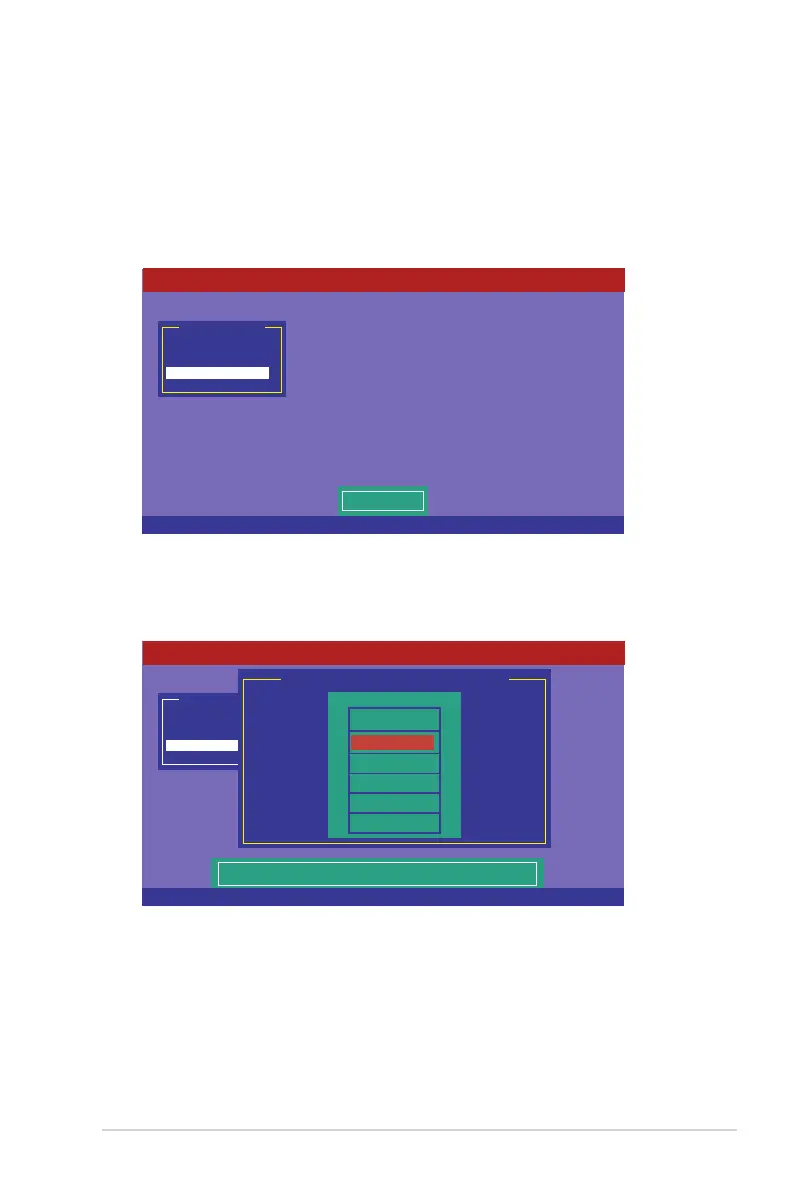
5.2.4 Rebuilding failed drives
You can manually rebuild failed hard disk drives using the
Rebuild
command in the
Management Menu
.
To rebuild a failed hard disk drive
1. From the
Management Menu
, select
Rebuild
, and then press <Enter>.
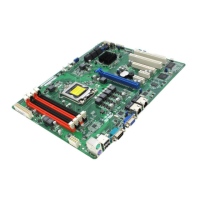
2. The
PHYSICAL DRIVES SELECTION MENU
displays the available drives
connected to the SATA ports. Select the drive you want to rebuild, and then
press <Space>.
Management Menu
Congure
Initialize
Objects
Rebuild
Check Consistency
Rebuild PD(s)
LSI Software RAID Conguration Utility Ver C.05 Sep 17, 2010
BIOS Version A.10.09231523R
Use Cursor Keys To Navigate Between Items And Press Enter To Select An Option
Management Menu
Congure
Initialize
Objects
Rebuild
Check Consistency
Port # 1 DISK 77247MB HDS728080PLA380 PF20A60A
REBUILD - PHYSICAL DRIVES SELECTION MENU
PORT #
ONLIN A00-00
FAIL A00-01
0
1
LSI Software RAID Conguration Utility Ver C.05 Sep 17, 2010
BIOS Version A.10.09231523R
SPACE-(De)Select,F10-Start Rebuild,F2-Drive Information,F3-View Virtual Drives


 To Next Page