ASUS P8B-E/4L 5-11
When a RAID set already exists, using the
command
erases the existing RAID conguration data. If you do not want to delete the
existing RAID set, use the
command to view or create
another RAID conguration.
To create a RAID set using the
option
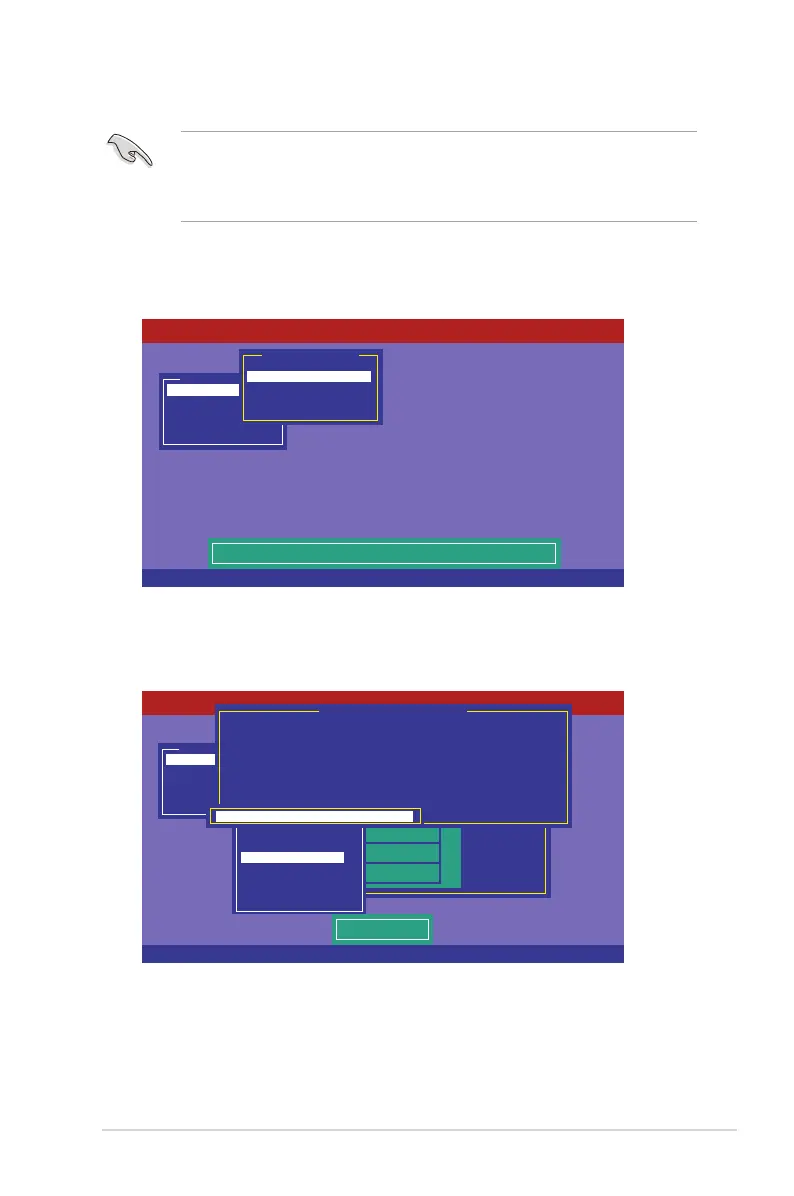
1. From the
Management Menu
, select
and
then press <Enter>.
Management Menu
Congure
Initialize
Objects
Rebuild
Check Consistency
Clear Existing Conguration And Start A New Conguration
Conguration Menu
Easy Conguration
New Conguration
View/Add Conguration
Clear Conguration
Select Boot Drive
LSI Software RAID Conguration Utility Ver C.05 Sep 17, 2010
BIOS Version A.10.09231523R
Use Cursor Keys to Navigate Between Items And Press Enter To Select An Option
2. Follow step 2 to 9 of the previous section:
.
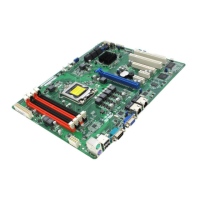
3. Select
Size
from the
Virtual Drive
menu, and then press <Enter>.
4. Key-in the desired virtual drive size, and then press <Enter>.
5. Follow step 10 to 14 of the previous section:
to
create the RAID set.
Management Menu
Congure
Initialize
Objects
Rebuild
Check Consistency
PORT #
LSI Software RAID Conguration Utility Ver C.05 Sep 17, 2010
BIOS Version A.10.09231523R
DNLIN A00-00
DNLIN A00-01
0
1
Easy Conguration - ARRAY SELECTION MENU
Virtual Drive(s) Congured
LD RAID Size #Stripes StripSz Status
0 1 148.580GB 2 64 KB ONLINE
Virtual Drive 0
RAID = 1
Units= MB
Size = 152146MB
DWC = Off
RA = On
Accept
SPAN = NO
Enter VD Size:
Enter VD Size: 152146_
Use Cursor Keys to Navigate Between Items And Press Enter To Select An Option


 To Next Page