ASUS P8B-E/4L 2-23
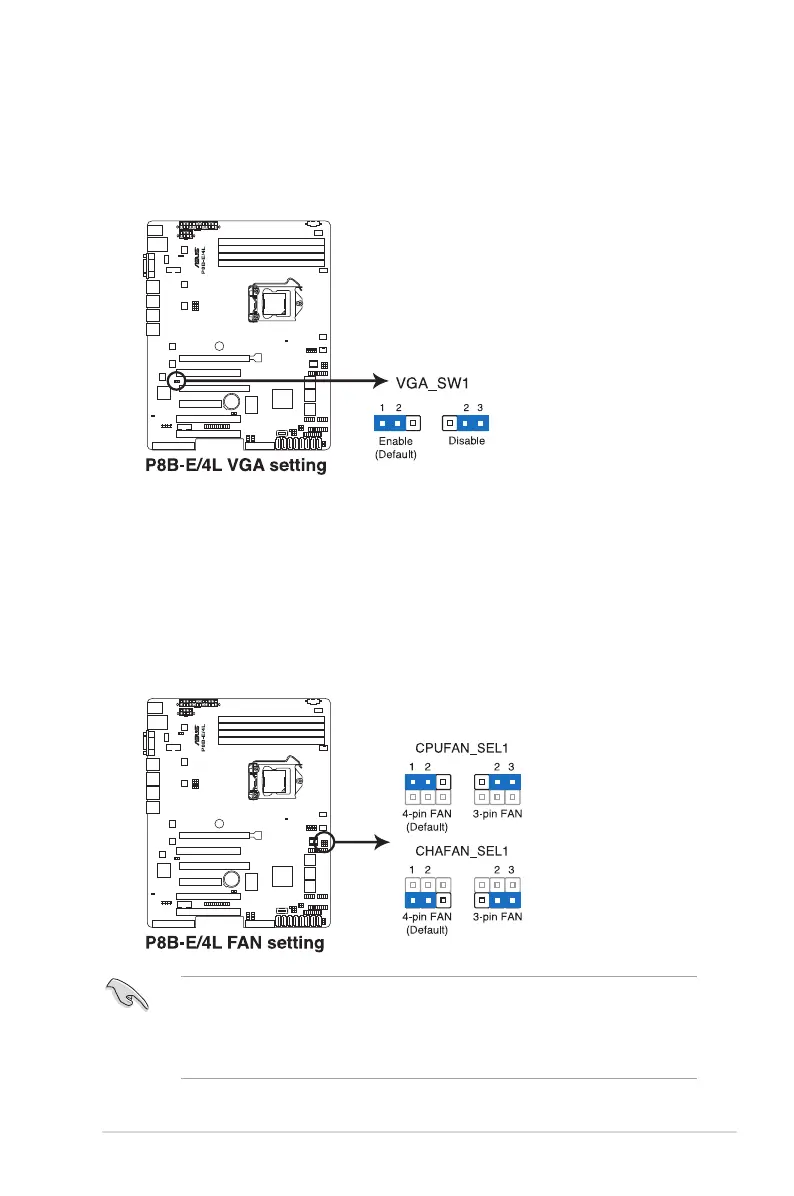
2. VGA controller setting (3-pin VGA_SW1)
This jumper allows you to enable or disable the onboard VGA controller. Set
to pins 1–2 to activate the VGA feature.
3. CPU Fan and Chassis Fan control setting
(3-pin CPUFAN_SEL1, CHAFAN_SEL1)
These jumpers allow you to switch for fan pin selection. The CPUFAN_SEL1
jumper is for the CPU fan control and the CHAFAN_SEL1 jumper is for the
front fans and rear fans control. Set to pins 1–2 when using 4-pin fans or pins
2–3 when using 3-pin fans.
• If you use a 4-pin fan but set the jumper to pin 2-3, the fan you installed
may not work.
• If you use a 3-pin fan but set the jumper for a 4-pin fan, the fan control will
not work and the fan you installed will always run at full speed.


 To Next Page