Need help?
Do you have a question about the Asus RP-AC53 and is the answer not in the manual?
List of items included in the package for the wireless repeater.
Document detailing the warranty coverage for the product.
The guide itself, providing initial setup instructions.
Instructions on powering on the RP-AC53 repeater.
Identification and description of the repeater's buttons and LEDs.
Guide to connecting the repeater using the WPS feature.
How to confirm successful connection via the Wi-Fi indicator status.
Explanation of how the repeater renames the network (SSID).
Instructions for connecting the repeater via the Graphical User Interface.
Recommendations for placing the repeater for best performance.
Table explaining Wi-Fi LED status and performance.
Solution for routers that do not support the WPS feature.
Troubleshooting steps when the Wi-Fi LED does not illuminate.
Steps to resolve issues accessing the repeater's login page.
Procedure for resetting the RP-AC53 device.
Troubleshooting when only one Wi-Fi band LED is active.
Steps to resolve issues accessing the web GUI for configuration.
Steps to disable the proxy server setting in Windows 7.
How to configure TCP/IP settings for automatic IP address acquisition.
Steps to disable the proxy server setting on Mac 10.5.8.
How to configure TCP/IP settings for automatic IP address acquisition on Mac.
Statement on compliance with FCC Part 15 rules.
Information regarding potential harmful interference and user actions.
Restriction on co-locating the device with other antennas or transmitters.
Statement on compliance with EU radiation exposure limits.
Information on complying with REACH regulations.
Details on ASUS recycling and takeback programs.
Statement on compliance with ISED standards for Canada.
Information on radiated output power and exposure limits.
Advice on using the device in airports, hospitals, etc.
Precautions regarding interference with medical devices.
Guidance on using the device in good reception conditions.
Advice regarding proximity to pregnant women and teenagers.
Recommended ambient temperature range for operation.
Ensure the power adapter meets rating requirements.
Do not place on uneven or unstable surfaces.
Do not place or drop objects on or insert foreign objects into the product.
Avoid exposure to liquids, rain, moisture, and use during electrical storms.
Do not cover vents to prevent overheating.
Do not use damaged power cords or peripherals.
Do not attempt to fix a broken adapter yourself.
Disconnect power before relocating the system to prevent shock.
 General
| Maximum data transfer rate | 433 Mbit/s |
|---|---|
| Supported data transfer rates | 1, 2, 5.5, 6, 9, 11, 12, 18, 24, 36, 48, 54, 300, 433 |
| Antennas quantity | 2 |
| Wi-Fi | Yes |
| Wi-Fi band | Dual-band (2.4 GHz / 5 GHz) |
| Top Wi-Fi standard | Wi-Fi 5 (802.11ac) |
| Cabling technology | 10/100Base-T(X) |
| Networking standards | IEEE 802.11a, IEEE 802.11ac, IEEE 802.11b, IEEE 802.11g, IEEE 802.11n |
| Ethernet LAN data rates | 10, 100 Mbit/s |
| Ethernet LAN interface type | Fast Ethernet |
| Connectivity technology | Wired & Wireless |
| Ethernet LAN (RJ-45) ports | 1 |
| Security algorithms | WPA-PSK, WPA2-PSK, WPS |
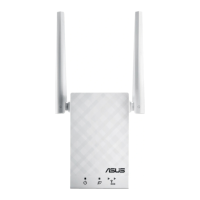
| Product type | Network repeater |
| Product color | White |
| LED indicators | LAN, Power, WLAN |
| Quantity per pack | 1 pc(s) |
 Weight and Dimensions
| Depth | 54 mm |
|---|---|
| Width | 110 mm |
| Height | 38 mm |
| Weight | 200 g |


 To Next Page