Need help?
Do you have a question about the Asus RP-AC66 and is the answer not in the manual?
Initial steps to power on the RP-AC66 repeater and wait for the Power LED to become solid green.
Methods to connect the Repeater to your wireless network, including GUI and WPS options.
Steps to connect via the Graphical User Interface using a web browser and default credentials.
Steps to connect using the Wi-Fi Protected Setup (WPS) button on the router/AP and the Repeater.
Steps to resolve web GUI access issues on Windows 7 by disabling proxy and setting TCP/IP automatically.
Steps to resolve web GUI access issues on Mac OS by disabling proxy and setting TCP/IP automatically.
 General
| Antenna gain level (max) | 4 dBi |
|---|---|
| Networking standards | IEEE 802.11a, IEEE 802.11ac, IEEE 802.11b, IEEE 802.11g, IEEE 802.11n |
| Maximum data transfer rate | 1300 Mbit/s |
| Supported data transfer rates | 450 Mbit/s, 1300 Mbit/s |
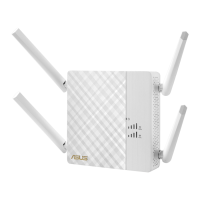
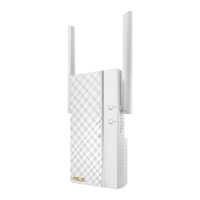
| Product color | White |
| LED indicators | Power, WLAN |
| Internal memory | 64 MB |
| WPS push button | Yes |
| Security algorithms | WPA-PSK, WPA2-PSK, WPS |
| Connectivity technology | Wired |
| Ethernet LAN (RJ-45) ports | 1 |
| Compatible operating systems | Windows 10, Windows 8.1, Windows 8, Windows 7, Windows XP, Mac OS X 10.5, Mac OS X 10.6, Mac OS X 10.7, Mac OS X 10.8, Mac OS X 10.9, Mac OS X 10.10 |
| Cables included | AC |
| Frequency band | 2.4, 5 GHz |
 Weight and Dimensions
| Dimensions (WxDxH) | 139 x 85 x 33.5 mm |
|---|

 To Next Page