63
3.15.2 Using Servers Center
Servers Center allows you to share the media les from the USB
disk via a Media Server directory, Samba share service, or FTP
share service. You can also congure other settings for the USB
disk in the Servers Center.
Using Media Server
Your wireless router allows DLNA-supported devices to access
multimedia les from the USB disk connected to your wireless
router.
NOTE: Before using the DLNA Media Server function, connect your
device to RT-AX86U PRO’s network.
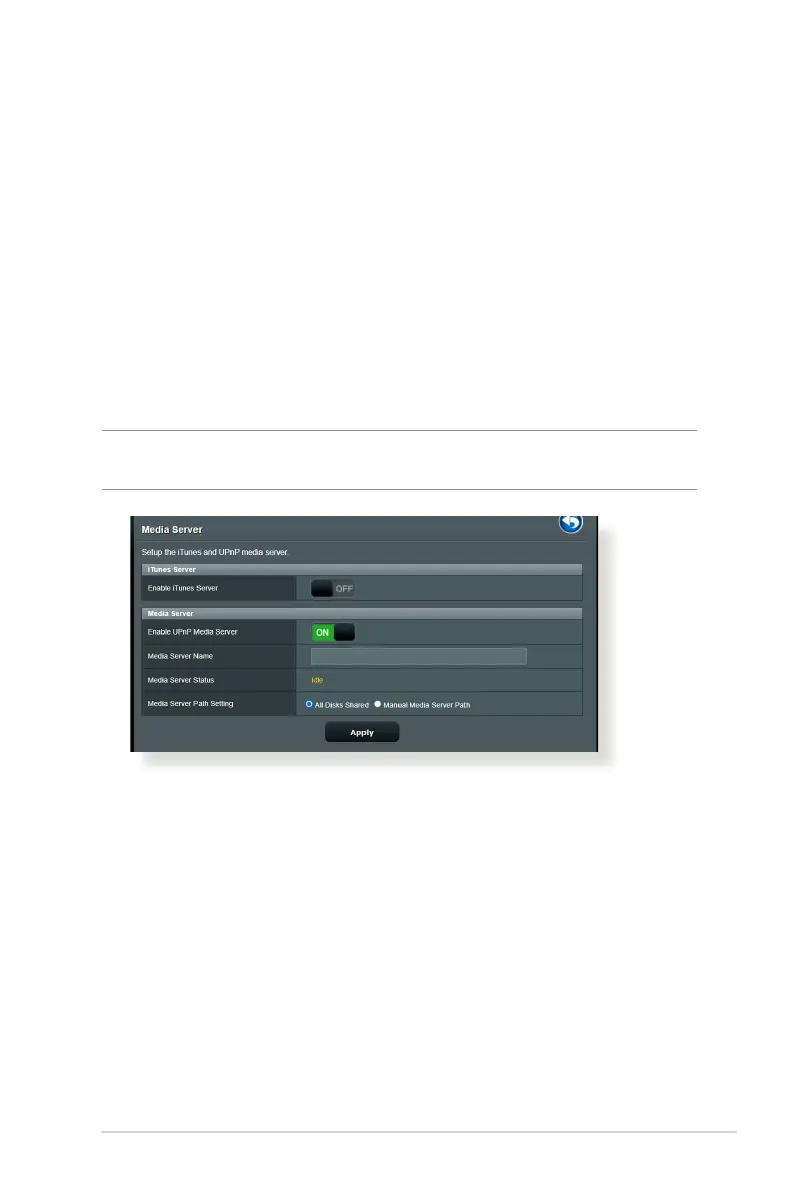
To launch the Media Server setting page, go to General > USB
application > Servers Center> Media Servers tab. Refer to the
following for the descriptions of the elds:
• Enable iTunes Server?: Select ON/OFF to enable/disable the
iTunes Server.
• Enable UPnP Media Server?: Select ON/OFF to enable/
disable the UPnP Media Server.
• Media Server Status: Displays the status of the media server.
• Media Server Path Setting: Select All Disks Shared or
Manual Media Server Path.


 To Next Page