Home
Asus
Wireless Router
RT-N10
Page 28 (Creating Multiple SSID Profiles)
Asus RT-N10 - Creating Multiple SSID Profiles
70 pages
Manual
Save Page as PDF
To Next Page
To Next Page
To Previous Page
To Previous Page
Loading...
28
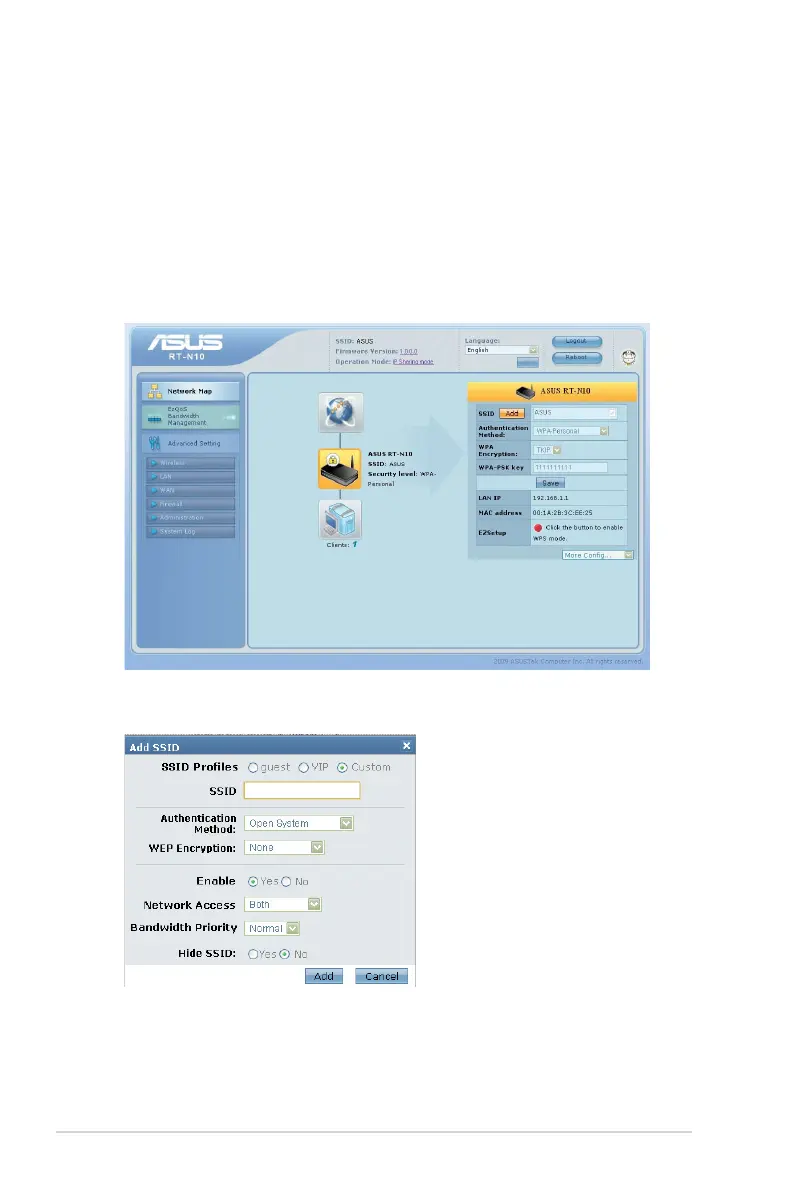
Crea
ting multiple SSID profiles
This wireless rout
er allows you t
o create multiple SSID pr
ofiles for
specific tasks.
T
o create an SSID profile:
1.
Under
Sy
stem status
,
click
Add
.
2.
Configure the pr
ofile settings,
then click
Add
.
27
29
Table of Contents
Main Page
Default Chapter
1
User Guide
1
Table of Contents
3
1 Getting to Know Your Wireless Router
5
Package Contents
5
Hardware Features
6
Bottom Panel
8
2 Setting up Your Wireless Network
9
Positioning Your Router
9
What You Need
10
Setting up Your Wireless Router
10
Router Mode
11
Repeater Mode
15
AP Mode
17
3 Configuring the Network Clients
19
4 Network Configuration Using the Web GUI
25
Logging into the Router Web GUI
25
Using the Network Map
27
Creating Multiple SSID Profiles
28
Managing Bandwidth with Ezqos
29
Upgrading the Firmware
31
Restoring/Saving/Uploading Settings
32
5 Using the Utilities
33
Device Discovery
34
Firmware Restoration
35
WPS Wizard
37
Adding Network Devices Using a USB Flash Drive
43
6 Troubleshooting
45
ASUS DDNS Service
49
Appendices
51
Notices
51
Safety Information
53
Licensing Information
56
Networks Global Hotline Information
65
ASUS Contact Information
68
Other manuals for Asus RT-N10
User Manual
56 pages
Quick Start Guide
2 pages
Related product manuals
Asus RT-N12
58 pages
Asus RT-N16
66 pages
Asus RT-N13
46 pages
Asus RT-N12E
26 pages
Asus RT-N10E
46 pages
Asus RT-N10U
72 pages
Asus RT-N10P
66 pages
Asus RT-N12HP
2 pages
Asus RT-N12 C1
54 pages
Asus RT-N10E EZ N
52 pages
Asus RT-N12 Series
68 pages
Asus RT-N10 B1 (RT-N10+ B1
53 pages



 To Next Page