4
3.3 WAN Connection Type ---- Static IP
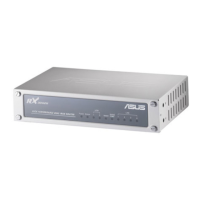
a) Click WAN ÎConnection, Select WAN Connection Mode as Static IP Address.
b) Configure Static IP Address Î Input IP Address, Subnet Mask, ISP Gateway provided
by your ISP. MAC Cloning is optional as your ISP request.
c) If your ISP provides more IP addresses, please select Yes for enabling more IP
addresses, and fill More IP Addresses, then click Add button.
d) Then click OK to save and apply the setting.
e) Click Continue back to configuration page.


 To Next Page