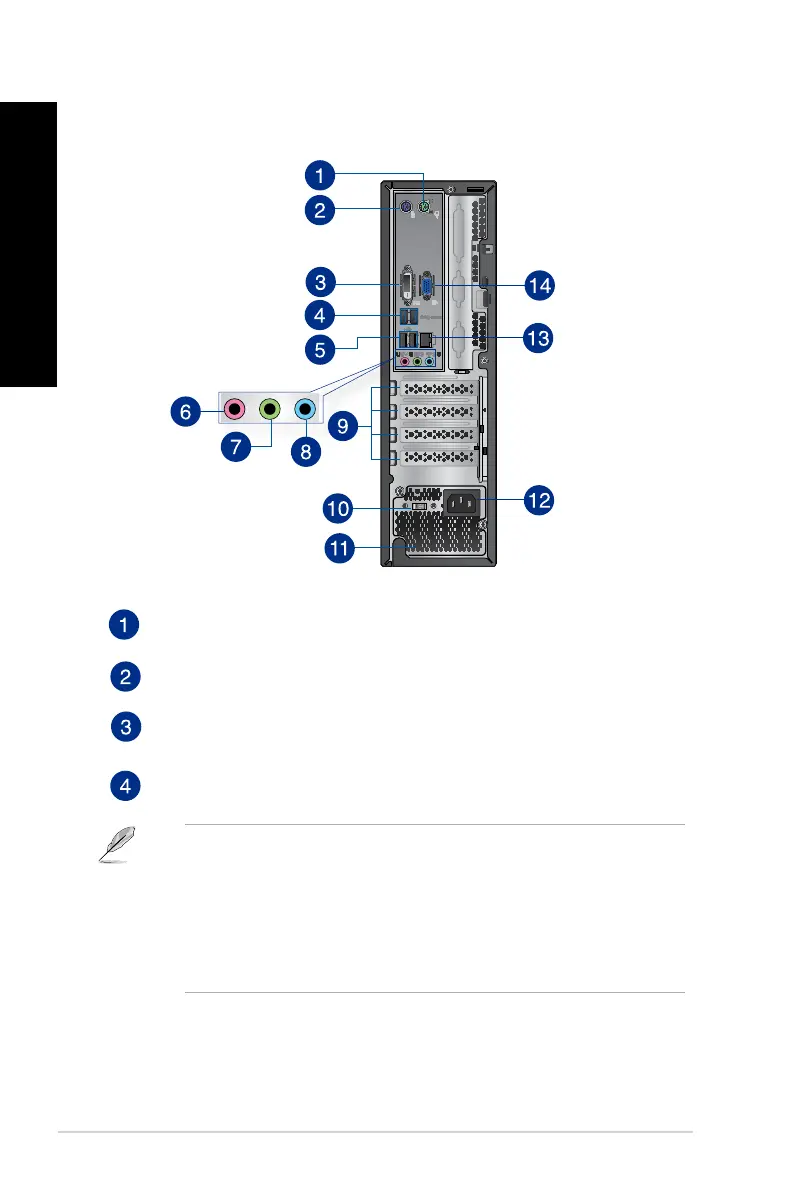
PS/2 mouse port (green). This port is for a PS/2 mouse.
PS/2 keyboard port (purple). This port is for a PS/2 keyboard.
DVI-D port. This port is for any DVI-D compatible device and is HDCP compliant
allowing playback of HD DVD, Blu-ray, and other protected content.
USB 3.0 ports. These Universal Serial Bus 3.0 (USB 3.0) ports connect to USB 3.0 devices
such as a mouse, printer, scanner, camera, PDA, and others.
• DONOTconnectakeyboard/mousetoanyUSB3.0portwheninstallingaWindows
®
operating system.
• DuetoUSB3.0controllerlimitations,USB3.0devicescanonlybeusedunderaWindows
®
OS environment and after USB 3.0 driver installation.
• USB3.0devicescanbeusedfordatastorageonly.
• WestronglyrecommendthatyouconnectUSB3.0devicestoUSB3.0portsforafasterand
better performance for your USB 3.0 devices.
22
Chapter 1: Getting started
ENGLISH
ENGLISH
BP6335 (SD560)


 To Next Page