22
ASUS Xonar DSX
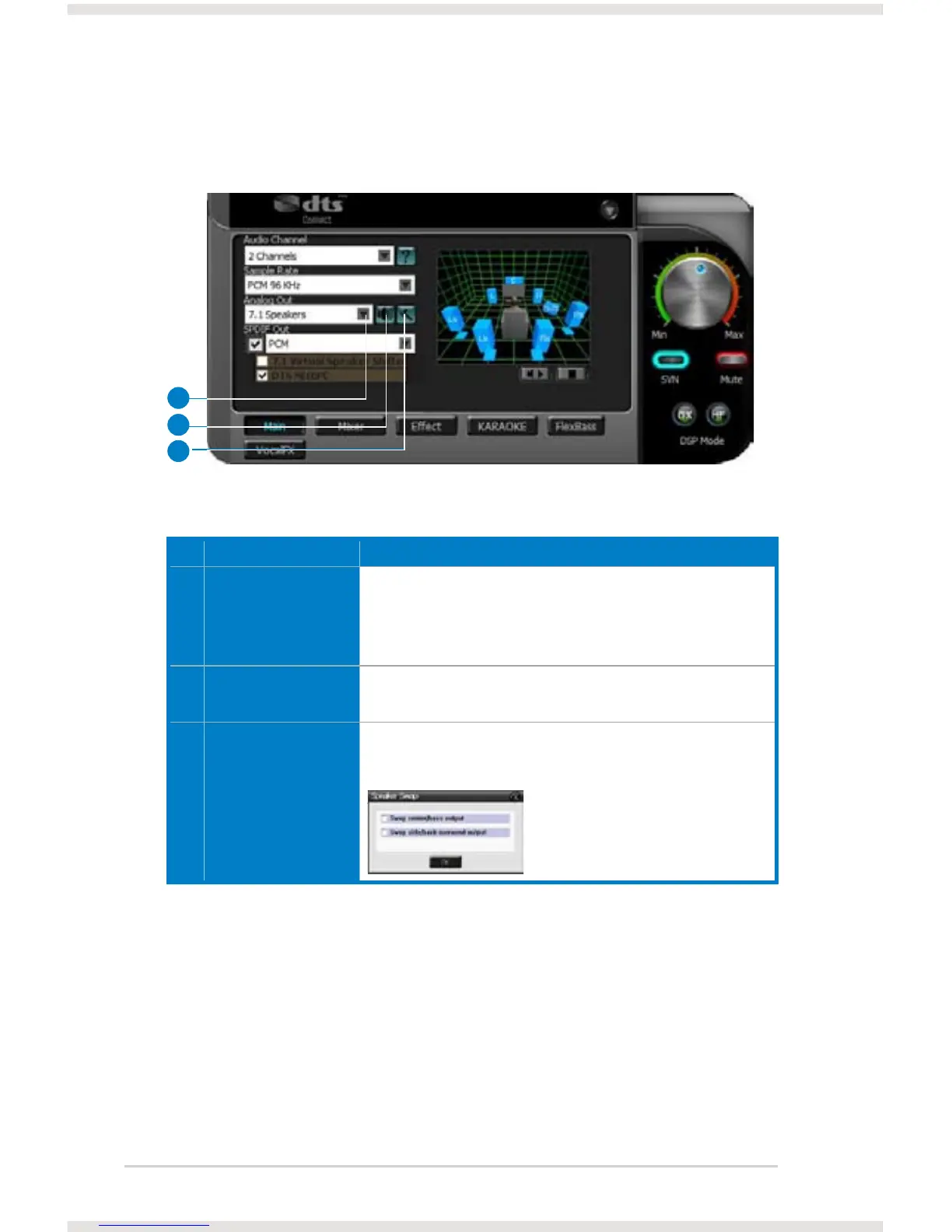
6.2.2 Analog Out mode
No Item Description
1 Analog Out The Analog Out setting is used to match your actual speaker setting,
such as headphones, 2 speakers (or 2.1), 4 speakers (or 4.1), 5.1
speakers, 7.1 speakers, Front Panel Headphone and Front Panel
2 speakers (or 2.1). Xonar DSX will play the channels and do the
proper 3D/DTS sound processing accordingly. Select the correct
speaker type for your connected speakers.
2 Speaker Test Click this button to show the speaker test window in the right pane.
Click the “play” button to test each speaker one by one or click each
speaker manually to test.
3 HP Advanced Setting Clicking this button will pop up an advanced setting window to allow
you to:
– Swap center/bass outputs for 5.1/7.1-speaker set ups
– Swap Side/Back Surroud outputs for 7.1-speaker set ups
Check the box if your speakers are outputting the incorrect channel.
Otherwise, leave them blank.
1
2
3



 To Next Page