GLOSSARY
The following are a few words that may serve you
well while reading this manual� These aren’t in depth
explanations, but should hopefully give you the basics
and a place to start�
Balanced Connections – balanced connections offer
three conductors, carrying a ground, an in-phase signal,
and an out-of-phase signal� Once the two signals are sent
from one device to another, the out-of-phase signal has
its phase inverted and the two signals are combined� Any
interference picked up along the way is removed through
to phase cancellation� This allows cables to be run over
long distances without collecting excessive noise on the
way�
Compressor – a Compressor reduces signals over a
user-dened threshold by a user-dened amount/ratio.
Dynamic Processor – is any kind of processor that
dynamically – or in real time – adjusts signal properties�
EQ – Equalizer – is a device or process that allows users
to boost or attenuate audio signals at specic frequencies.
Euroblock – These types of inputs allow for self-wiring
of connections for permanent installations� Check the
“Getting Started” section for more information on wiring�
GEQ – Graphic Equalizer – is in essence the same as
an equalizer, but this title is reserved for equalizers with
more ‘bands’ than the typical EQ. While a typical channel
EQ may only allow for 3 or 4 frequencies to be adjusted,
a graphic equalizer may allow for 31 different frequencies.
GUI – Graphical User Interface – this is the remote PC
software used for the DMP808�
HPF – High Pass Filter – a high pass lter will cut or
signicantly reduce all audio signals below a particular
CONTROLS & SETTINGS
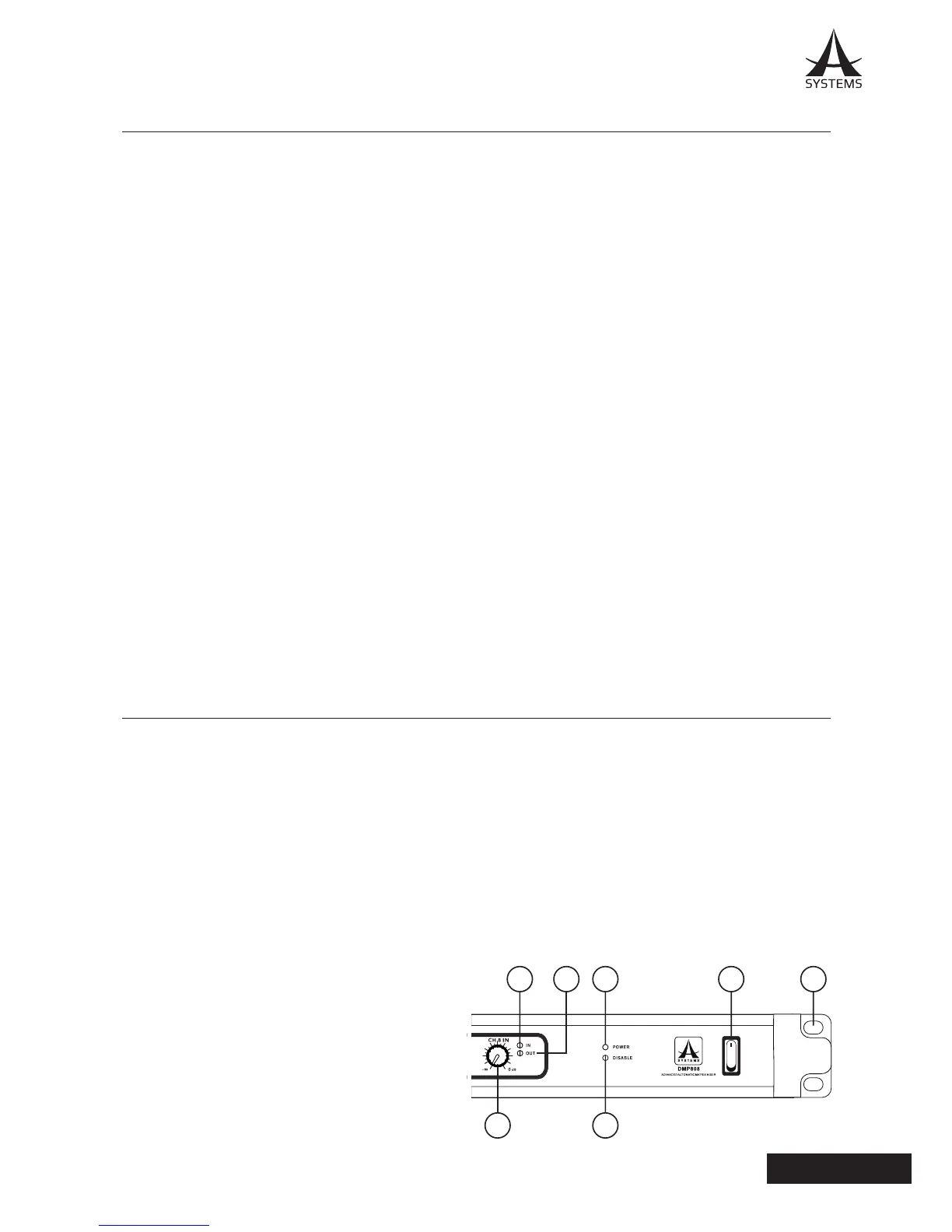
FRONT PANEL
1. Mounting Holes
These holes are for mounting the DMP808 on a standard
19” rack�
2. Power Switch
Flick this switch to sturn the unit on or put it on standy� Be
aware that the power switch can be disabled through the
A Systems DMP808 software�
3. Power LED
This LED indicator will illuminate when the DMP808
is activated – whether by switch or through the remote
software�
4. Disable LED
This LED will light up when the power switch is disabled�
When this occurs, the DMP808 cannot be turned on or
put on standby via the front panel switch� This function is
disabled within the A Systems PC software�
5. Output LEDs
The Mix Output LEDs will light up green when an output
signal is present on the corresponding output mix� It will
also ash red when the output channel clips. In this event,
you can reduce any excessive input signals, or turn down
your master output mix level through the control software�
6. Signal/Clip LED
This LED indicator is found on every input channel� When
a signal is present in the input channel, the LED will light
up green� When it clips, it will light up red� In the event that
the LED is red, we suggest reducing the input signal level�
Occasional ashes may be acceptable if it doesn’t affect
your program material�
7. Gain Controls
These rotary controls will allow users to adjust the nal
input level for channels 1 through 8�
user-dened frequency, allowing – as the name suggests
– high frequency sounds to pass through�
High Shelf Filter – the high shelf lter will reduce or
increase all audio signals below a particular frequency�
The level at which the signal is boosted/attenuated is
determined by the user�
Limiter – work just as compressors do; however with an
input to output signal ratio permanently set to innity-to-1.
LPF – Low Pass Filter – a low pass lter will cut all
audio signals above a particular user-dened frequency,
allowing low frequency sounds to pass through� This is
signicantly useful when using subwoofer speakers on
particular outputs�
Low Shelf Filter – the low shelf reduces or increases
the level of audio signals below a particular frequency
selected by the user� The level at which the signal is
altered is also set by the user�
Network – a network is a series or group of computers that
are interconnected so as to share information� In the case
of the DMP808, the network allows for remote operation
of the device using our Windows-based computer�
Noise Gate – a noise gate is a dynamic process that
turns off or signicantly attenuates the audio signal
passing through it when the signal level falls below a user
adjustable threshold�
Unbalanced Connections – unlike balanced connections,
unbalanced connections only have 2 conductors: one for
the signal and one for the grounding� This, unfortunately,
makes them more susceptible to noise and interference�


 To Next Page
 Loading...