Getting started
4
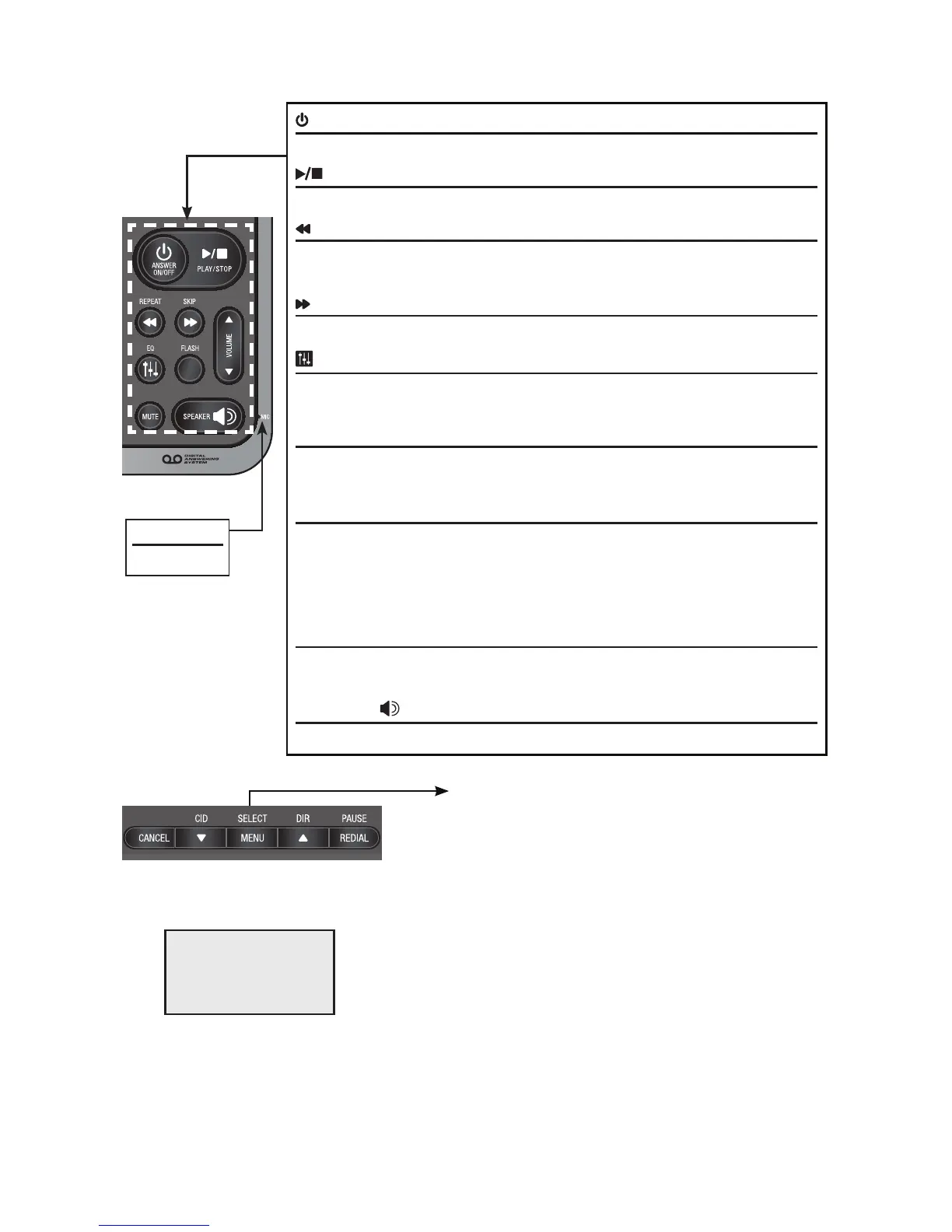
MIC
Microphone
/ANSWER ON/OFF
Press to turn the built-in answering system on or off (page 69).
/PLAY/STOP
Press to start or stop message playback (page 78).
/REPEAT
During playback, press to repeat the playing message (page 79).
During playback, press twice to play the previous message (page 79).
/SKIP
Press to skip a message (page 79).
/EQ
During an outside call, intercom call, message or announcement playback,
press to change the audio quality to best suit your hearing (page 33).
FLASH
During a call, press to answer an incoming call when you receive
a call waiting alert (page 34).
q/VOLUME/p
During message playback or call screening, press to adjust the listening
volume (page 79).
While in idle mode, press to adjust the base ringer volume (page 77).
When on a call, press to adjust the listening volume (page 34).
MUTE
During a call, press to mute the microphone (page 34).
When the telephone is ringing, press to mute the ringer temporarily (page 31).
SPEAKER
Press to make or answer a call using the speakerphone (page 30).
Main menu
Answering sys (page 66)
Directory (page 49)
Caller ID log (page 59)
Intercom (page 40)
Ringers (page 22)
Set date/time (page 23)
Settings (page 24)
Website (page 29)
•
•
•
•
•
•
•
•
The > symbol highlights
a menu item.
>Answering sys
Directory
p
q
Main menu
Quick reference guide - telephone base
Using menus:
Press MENU/SELECT to show the menu.
Press qCID or pDIR to scroll through menu items.
Press MENU/SELECT to confirm or save changes to a highlighted menu item.
Press CANCEL to cancel an operation, back up to the previous menu, or
exit the menu display.
•
•
•
•


 To Next Page
 Loading...