Operation and maintenance manual AQUAmax
®
BASIC/CLASSIC
ATB WATER GmbH, Südstraße 2, D-32457 Porta Westfalica, www.atbwater.com /
Art.-No.: 9060 0210 / Status: 30.01.2019 / Page 15 from 40
Service mode
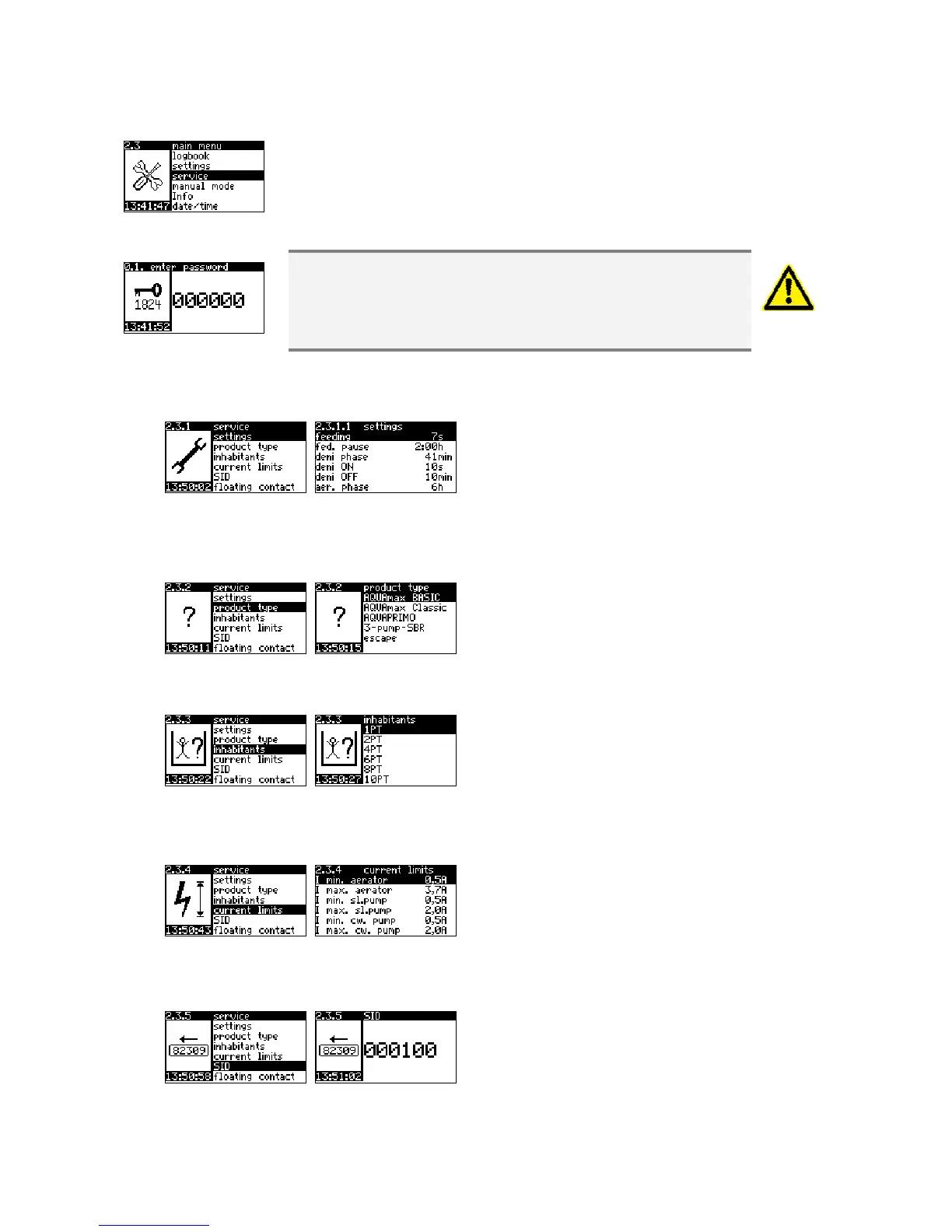
The access to the Service Mode takes place via a 6 figure code number,
which is made available exclusively to the authorised specialist firm.
In the Service Mode all parameters relevant and necessary for the
operation of the wastewater treatment plant are set and changed. Please
note that false inputs can lead to a faulty process!
The inputs are not checked for plausibility! ATB WATER
GmbH rejects any claims under warranty for the results of
inappropriate inputs!
Our service department will be very happy to provide you
with support.
Operating parameters
With the selection of the PT number with
commissioning, the parameters lodged in the
memory are loaded. At this point you have the
chance of carrying out modifications. For
description of the individual points see above
(Settings).
Product type
Selection of the product type.
Inhabitants
Selection of the connected inhabitants. The
associated parameter values are loaded
automatically.
Current Limits
Minimum/maximum current consumption of the
individual units below/above which an alarm
signal takes place.
Serial number
Possibility of correction of the serial number,
which is located on the AQUAmax
®
-frame (not
the serial number of the control unit!).
Please ensure that the serial number is entered
right-aligned, in order that leading zeros result.


 To Next Page