Qualcomm Atheros, Inc. • xxxv
COMPANY CONFIDENTIAL January 2012
Bluetooth Help Topics
Click this button to display any help topics.
Bluetooth Exchange Folder
Clicking this button to display the content of Bluetooth exchange folder. From Bluetooth
Suite window, choose Bluetooth->Bluetooth Exchange Folder to access Exchange
share folder for Object Push feature.
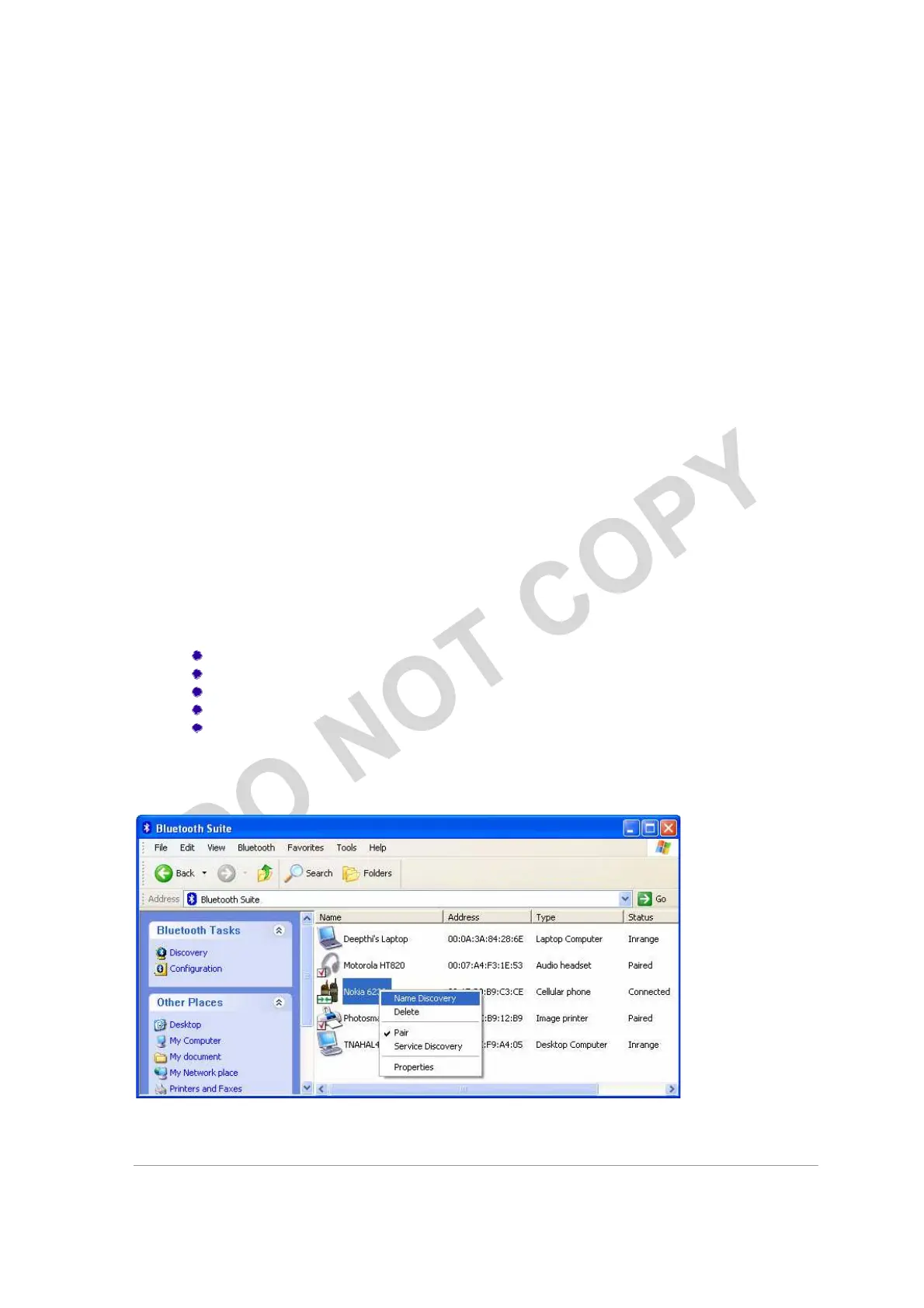
Bluetooth Places Panel
When you launch the Bluetooth Suite, various Bluetooth devices in the Bluetooth
neighborhood are listed on the right panel. These typically consist of
audio devices, computers (both laptop and desktop), phones, peripheral
devices such as Fax, printer, mouse, headset, and imaging devices. If
any of these devices are discovered, they are listed on the right
window panel. For example, if a Bluetooth mouse is discovered in the
Bluetooth neighborhood, it is shown as peripheral pointing device, its
brand name, address, and service status (in range, paired, connected or
disconnected). You can select a device and right mouse click button to
select the following:
Name discovery
Delete
Pair
Service Discovery
Properties
See Figure 2-9 for details.
Figure 2-9. Bluetooth Places Device Options



 To Next Page