Reference guide "1846- EN"
Navilink A59 Intelligent Room Temperature Controller
- 8 -
A
A
A
A
A
A
A
A
A
3.2 Pairing a sensor with a HP / Boiler
3.2.1 Pairing a 1
st
sensor with a HP / Boiler
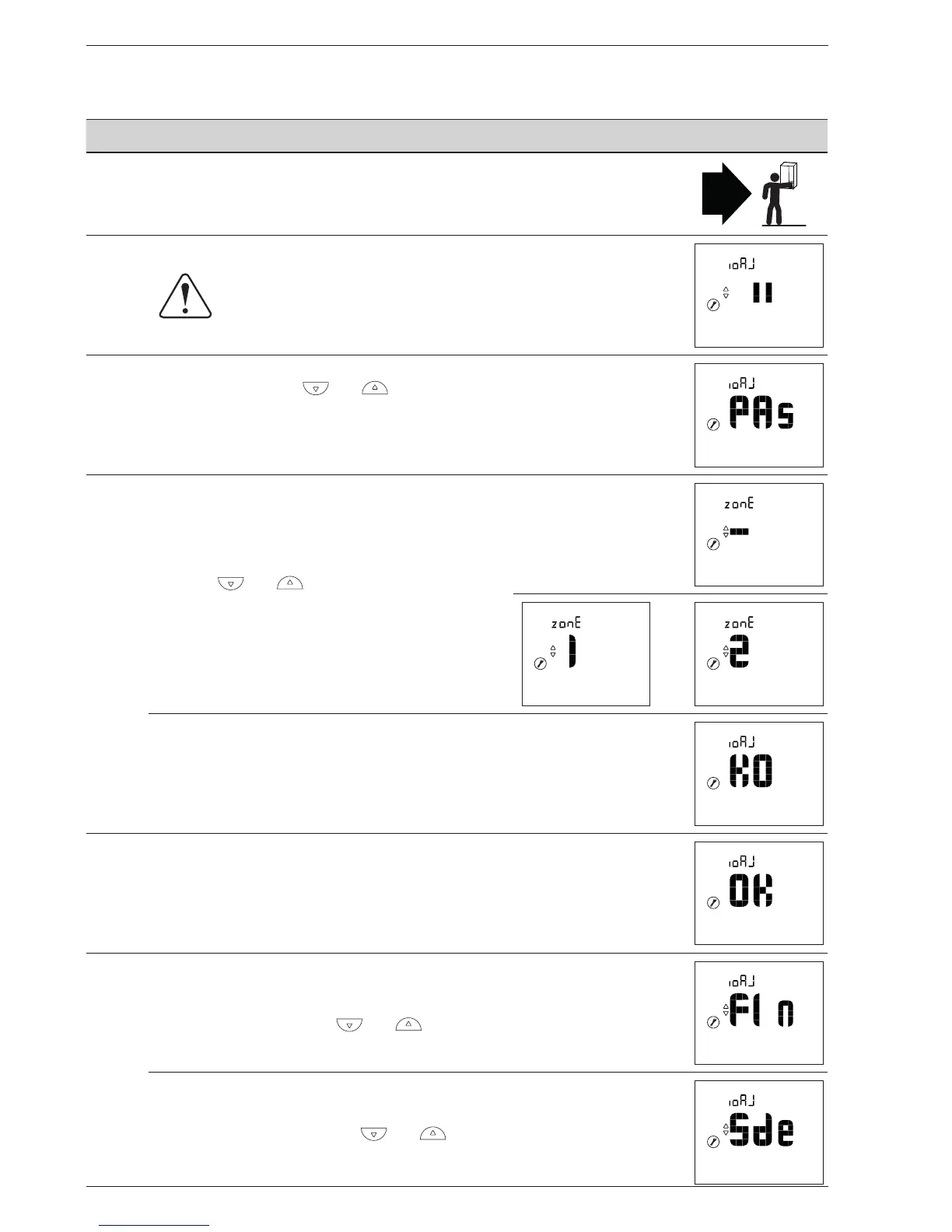
Action Description Display
1
On the boiler or heat pump, start the pairing procedure.
Please refer to the instructions supplied with the product.
2
Default display when sensor is rst commissioned.
3
Select "PAs" using the and buttons.
Wait 5 seconds.
"PAs" ashes. The sensor waits for pairing for 10 minutes.
4
Select the sensor's zone number
using the and buttons.
Wait 5 seconds.
or
Pairing failed.
Restart the procedure from step 2.
5 Pairing was successful.
6
If only one sensor is to be paired
Select "FIn" (end) using the and buttons.
If a 2
nd
sensor is to be paired
Select "Sde" (sensor) using the and buttons.
"Sde" ashes. The sensor waits for pairing for 10 minutes.


 To Next Page