19
After several hours of heating, depending on your installation, the temperature you read may be dif-
ferent to the one displayed on your device. In that case, you can calibrate the temperature displayed
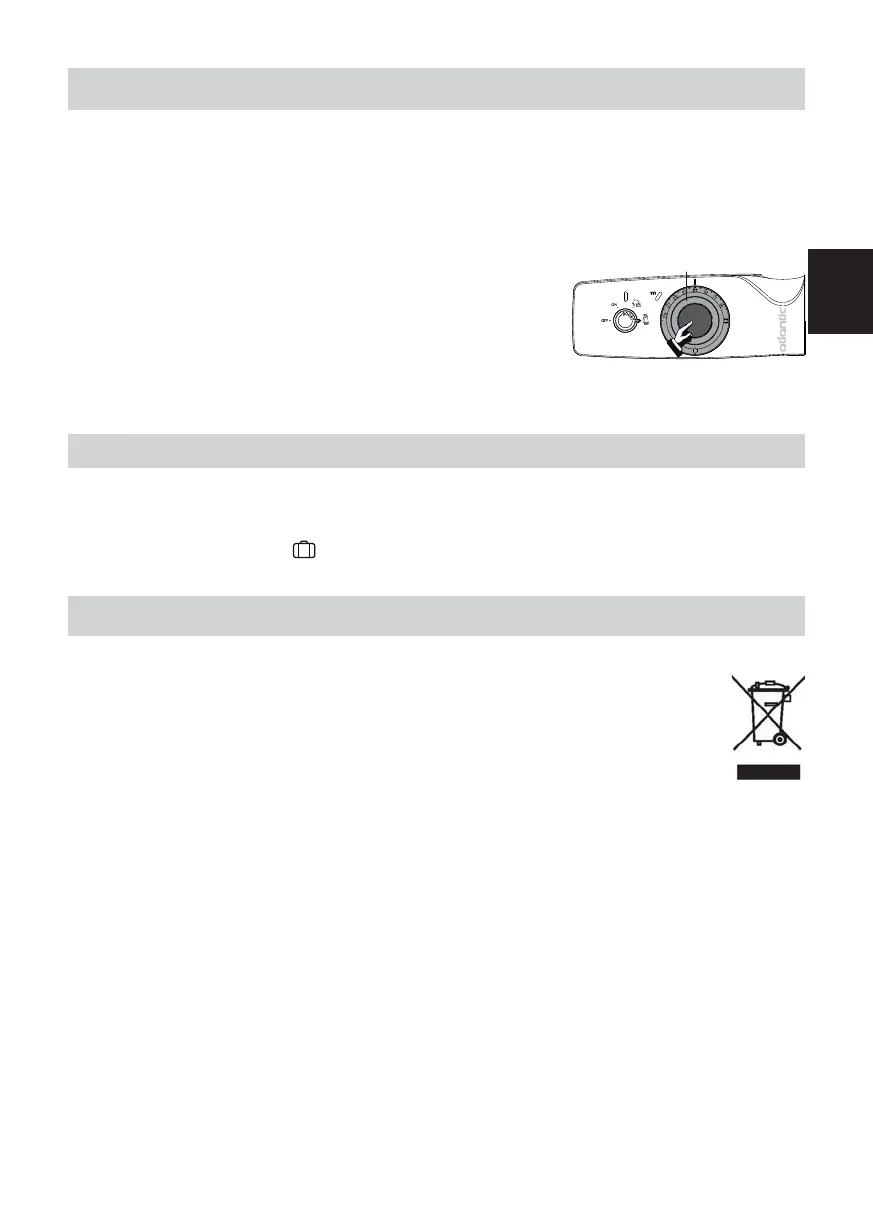
E.g.: wheel D is set to 21ºC.The temperature displayed on your thermometer is 20°C.
Pull the temperature setting wheel D while holding onto the central section.
Set the wheel to the temperature you have recorded on your ther-
mometer.
Then push the temperature setting wheel back to its original posi-
tion.
The device will now heat to maintain a temperature of 20°C.
D
CALIBRATE THE TEMPERATURE
- It is useless to set the device to maximum power, the bathroom temperature will not rise any fas-
ter.
- If you will be away for more than 48 hours : set the mode selection wheel A to ON and the tem-
perature setting wheel D to .
Your device will keep the temperature at 7°C (±3° C).
RECOMMENDATIONS OF USE
MAINTENANCE
- Switch off the device before any maintenance is performed.
- To maintain the performance of the device, about twice per year, clear the dust.
Do not use abrasive products.
- Devices with this symbol should not be disposed of with normal household rubbish but
instead must be collected separately and recycled.
The collection and recycling of products at the end of their service life must be carried
out in accordance with the local regulations.
GB











 To Next Page