8
EPIC 2DInstallation
3.3 ADJUSTMENTS AND SETTINGS (INITIALIZATION)
After making all the electrical connections,
switch on the control panel and wait for the
initial message to appear on the display.
To proceed with
self-learning procedure
, the
pumps must first be triggered.
Do not press confirm, but start the pumps,
keeping the “MAN” button pressed (for 3 sec.)
for P1 and P2.
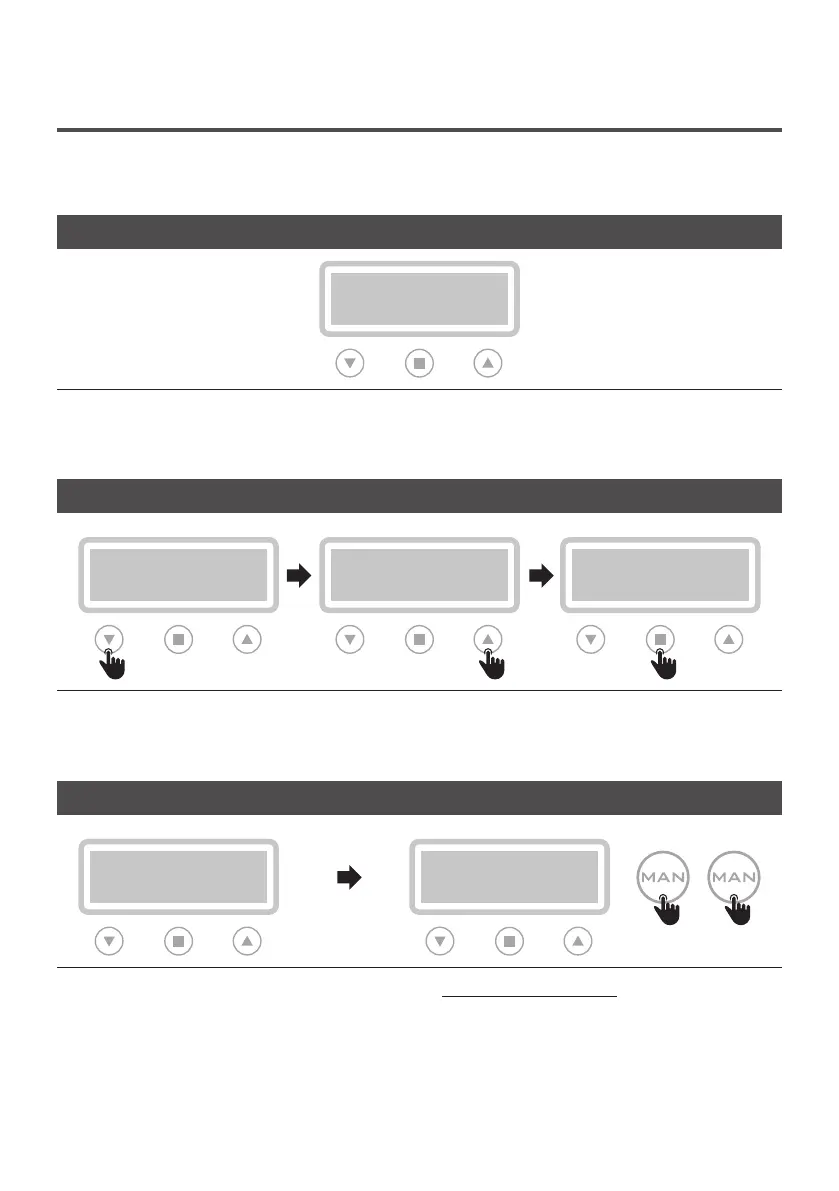
Select the display language by scrolling the menu
with the appropriate arrows (step 1 and 2).
When completed, press the confirm button (step 3)
to continue.
LANGUAGE SETTING (OBLIGATORY)
>LANGUAGE
>ITA
>LANGUAGE
>ITA
>LANGUAGE
>ENG
Step 1 Step 2 Step 3
PUMPS TRIGGER
AUTOTUNING: P1
PUSH CONFIRM
MANUAL PX
Step 4
P1 P2
3 sec. 3 sec.
CONTROL PANEL TURN ON
>LANGUAGE
>ITA


 To Next Page