10
Before performing any action, illuminate the screen by pressing any key.
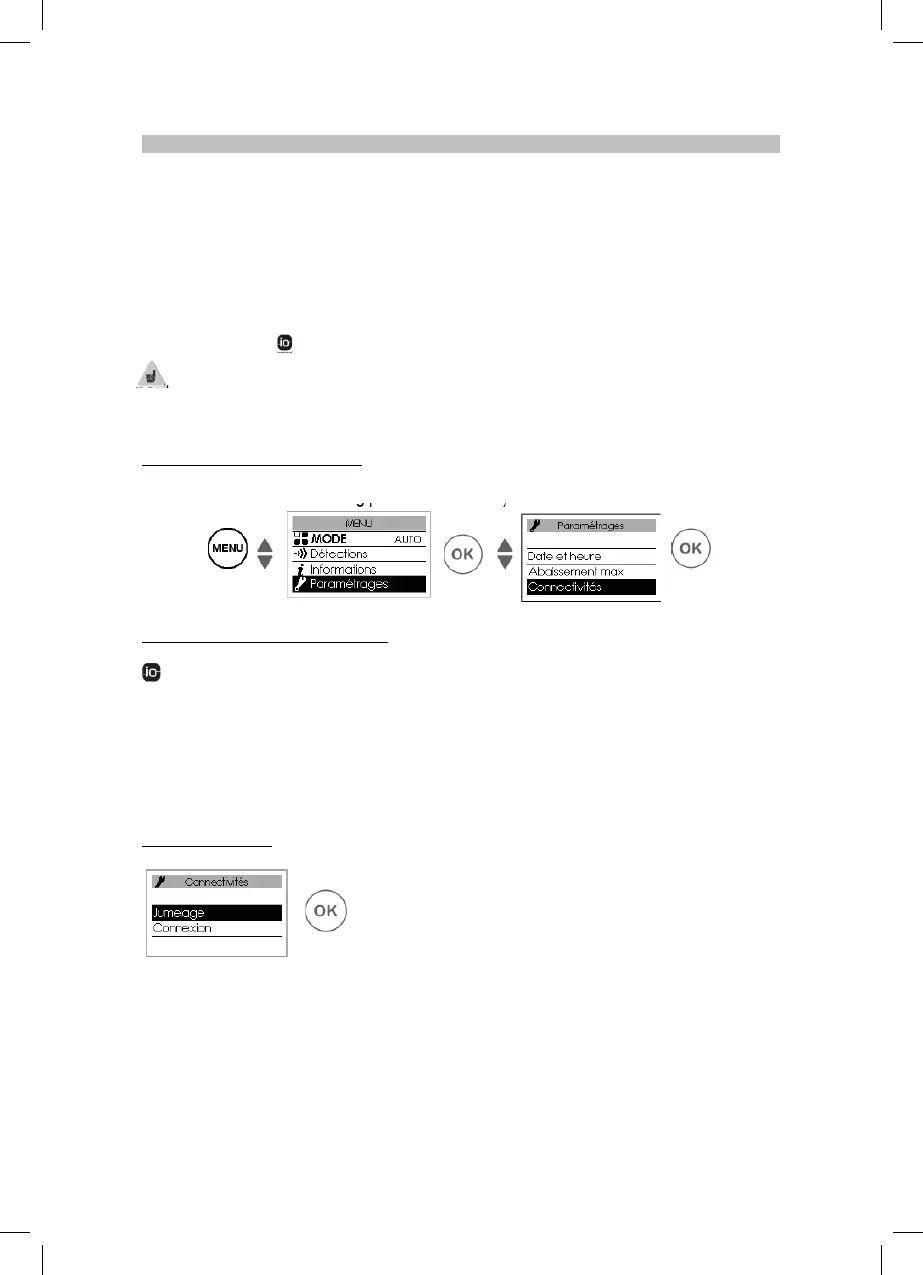
This menu grants access to the configurations for Connectivities.
Our units are compatible with iO-homecontrol®.
This highly secure wireless radio communication technology is integrated in a wide range of
household equipment proposed by home specialist partner brands.
With our heating appliances that integrate iO-homecontrol® you can perform the following tasks
through the Connectivity menu:
• Pair several compatible appliances in the same room.
For optimum operation, only appliances located in the same room should be paired (up to a
maximum of 5 appliances).
• Connect your appliances to the Cozytouch app to control them remotely (from the app).
3.1 - Accessing CONNECTIVITIES: (Auto mode for the Horizontal and Vertical version and Prog
Mode for the Plinth version).
3.1.1 - Pairing between appliances
appliances that are located in the same room can be paired so that they can communicate and
share information.
For example, when several appliances are paired, a change in the setpoint temperature or in a mode
on one appliance is immediately fed back to all the other appliances.
Similarly, if one of the appliances in the room detects your presence, it will send this information to
the other appliances.
Accessing PAIRING
For example: pairing 3 appliances in the same room:


 To Next Page