20
Before performing any action, illuminate the screen by pressing any key.
This menu grants access to the appliance's advanced functions.
together for 5 seconds
Allows appliance related information to be obtained that may be required if you
contact the after-sales department.
Configurations
Allows activation or deactivation of
automatic switching from summer time to
winter time.
This configuration is active by default.
Language Allows the language to be selected: French,
Used to return to the basic factory settings
(with Auto mode active, setpoint at 19°C,
reduction at 3°C, detection functions active).
Pairing between appliances, connection to
the app or connection to a control point will
Config.
It is possible, depending on your installation,
that you will record an ambient temperature
that differs from that displayed on your
appliance. Before performing any action, let
the temperature stabilise in Comfort mode
for at least 6 hours at the desired
temperature. You can then calibrate your
appliance to adjust the setpoint temperature
to the temperature recorded in the room.
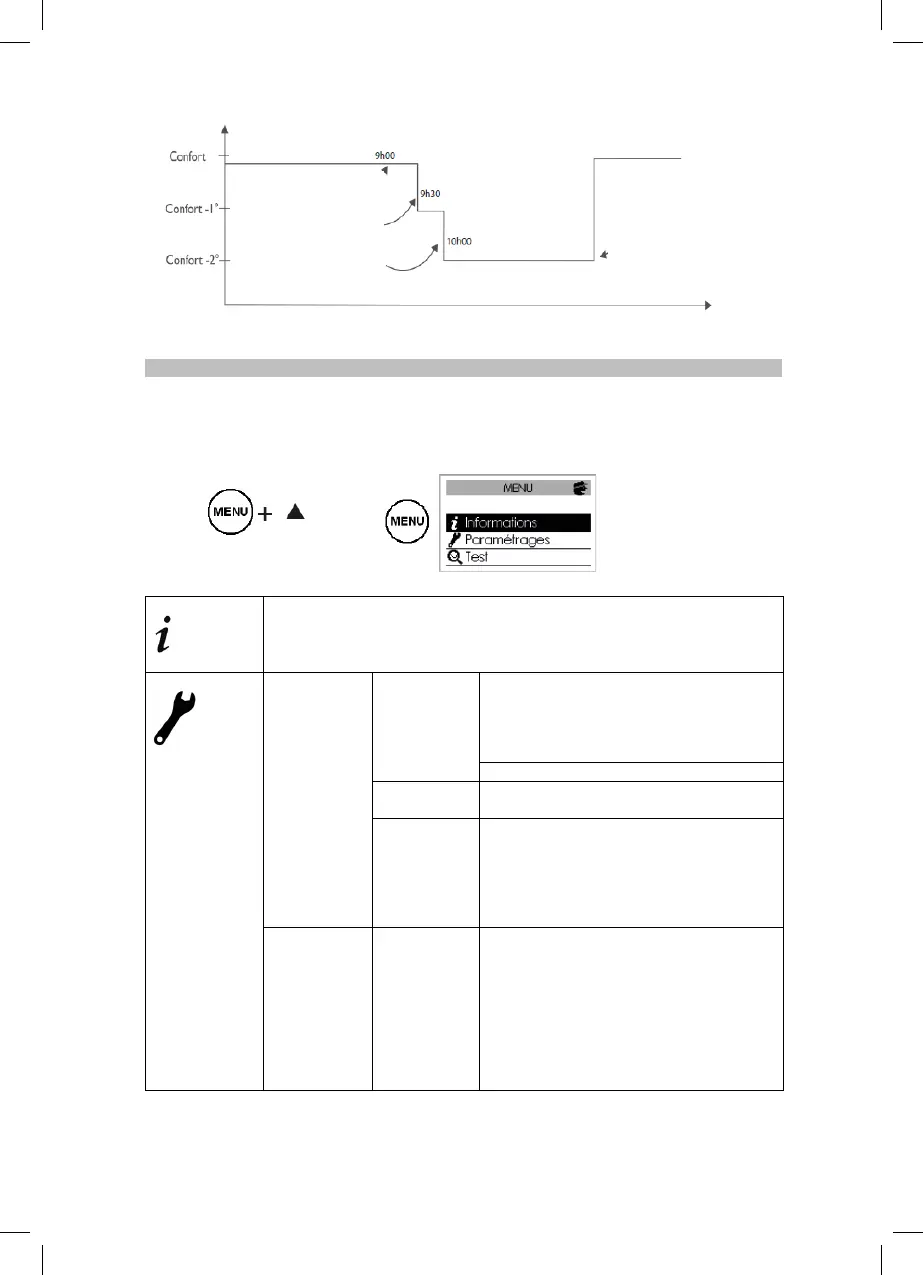
After ½ hour I switch to
comfort mode -1°
After another ½ hour I
switch to comfort mode -2°
My presence is detected
and I switch back to
comfort mode


 To Next Page