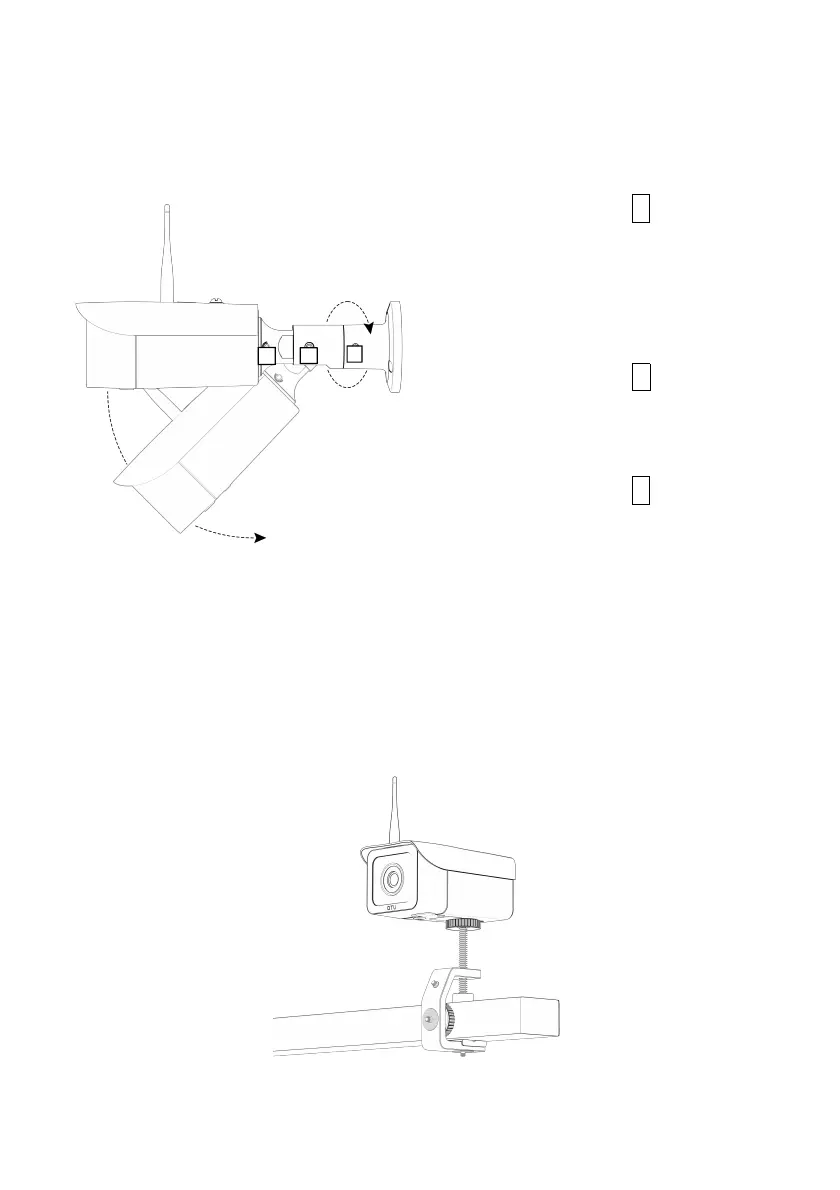
The wall mount bracket is adjustable with 360 degrees swivel
on the base, 90 degrees tilting angle, and 360 degrees swivel
on the camera body. This offers more flexibility when installing
the camera.
The other mounting option is to remove the wall mount, then
mount a c-clamp (not included) to the ¼” mounting point
located at the bottom of the camera.
Mounting with a c-clamp (Available for purchase separately)
1. Loosen the bolt C to swivel
the camera so that it is
pointing to the direction of
the scene desired and then
tighten it back.
2. Loosen the bolt B to adjust
the tilting angle as desired
and then tighten it back.
3. Loosen the bolt A to swivel
the camera to adjust the
orientation of the scene
desired and then tighten it
back.


 To Next Page