24
PARAMETER SETTINGS
ECHO
ECHO: Turns the ECHO effect on or off. Select ACTIVE to turn it on. Select BYPASSED
to turn it off.
INSERT: Positions the ECHO effect. Choose PRE to position the effect in the PRE-
EFFECTS section (mono, before the amp model). Choose POST to position the effect
in the POST-EFFECTS section (stereo, after the amp model).
TYPE: Select from the following ECHO modes / styles:
DIGITAL: Models a digital delay pedal with a full range echo repeat.
ANALOG: Models an analog-delay type pedal with a very warm echo repeat.
TAPE ECHO: Models a delay pedal based on audio tape, having echo repeats with a
mid-range peak.
DARK TAPE: Models a delay pedal similar to the TAPE ECHO mode but with a
darker rolloff on the echo repeats.
SOFT DIGITAL: Models a delay pedal similar to the DIGITAL mode but with a gentle
rolloff of the highs on the echo repeats
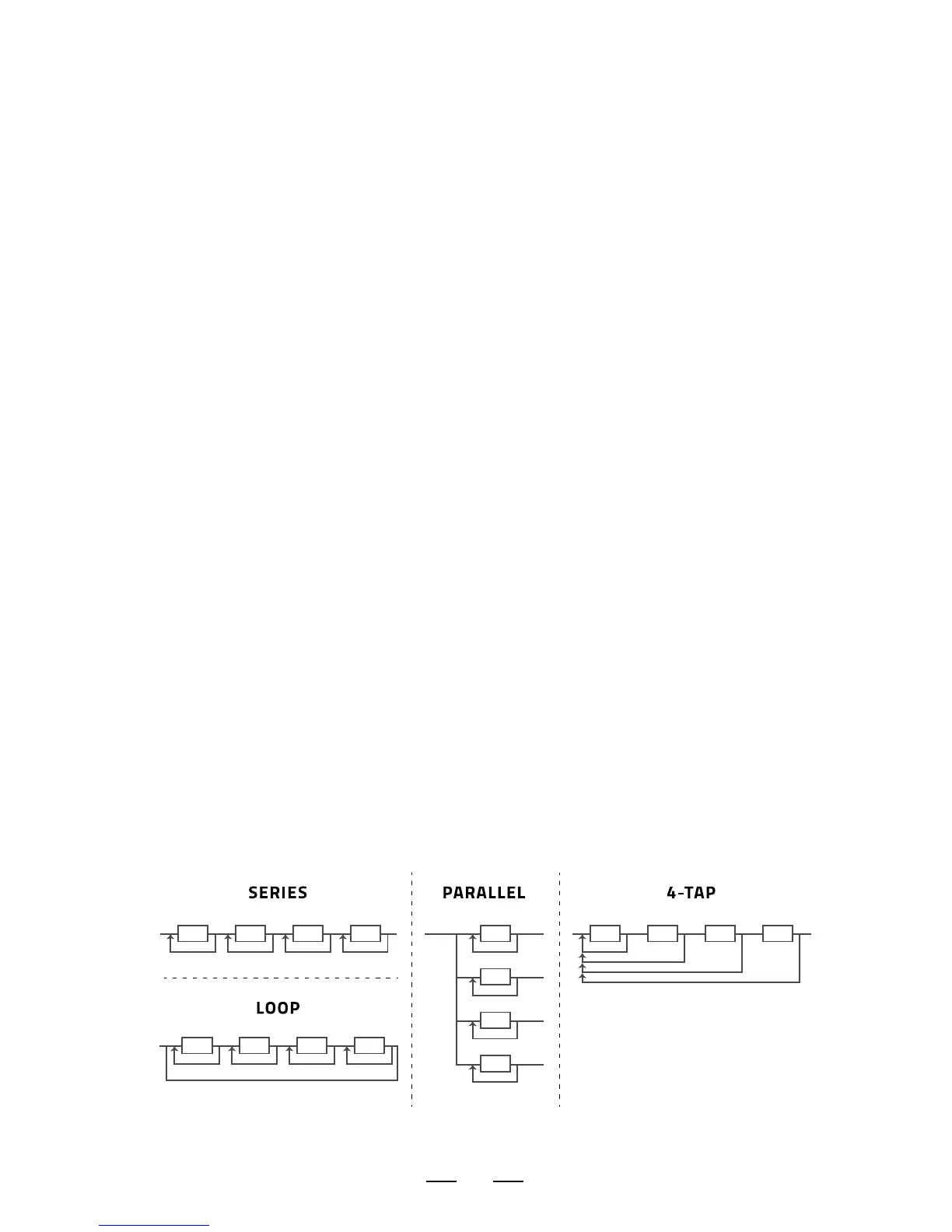
CONFIG: Select from 3 unique ECHO configurations (see diagram below):
SERIES: 4 individual delays aligned in a series configuration. The input feeds
into the first delay tap. The output of tap 1 feeds into tap 2, tap 2 feeds into tap 3,
etc. Each delay feeds back directly to its own input.
PARALLEL: 4 individual delays aligned in a parallel configuration. The input
feeds into all 4 taps. The output is then summed together. Each delay feeds back
directly to its own input only.
4-TAP: 4 individual delays aligned in a series configuration. The input feeds into
the first delay tap. The output of tap 1 feeds into tap 2, tap 2 feeds into tap 3, etc.
Unlike the regular SERIES configuration, in 4-TAP mode each delay feeds back to
the input of the FIRST delay tap.


 To Next Page