8
Expanding Your Rig
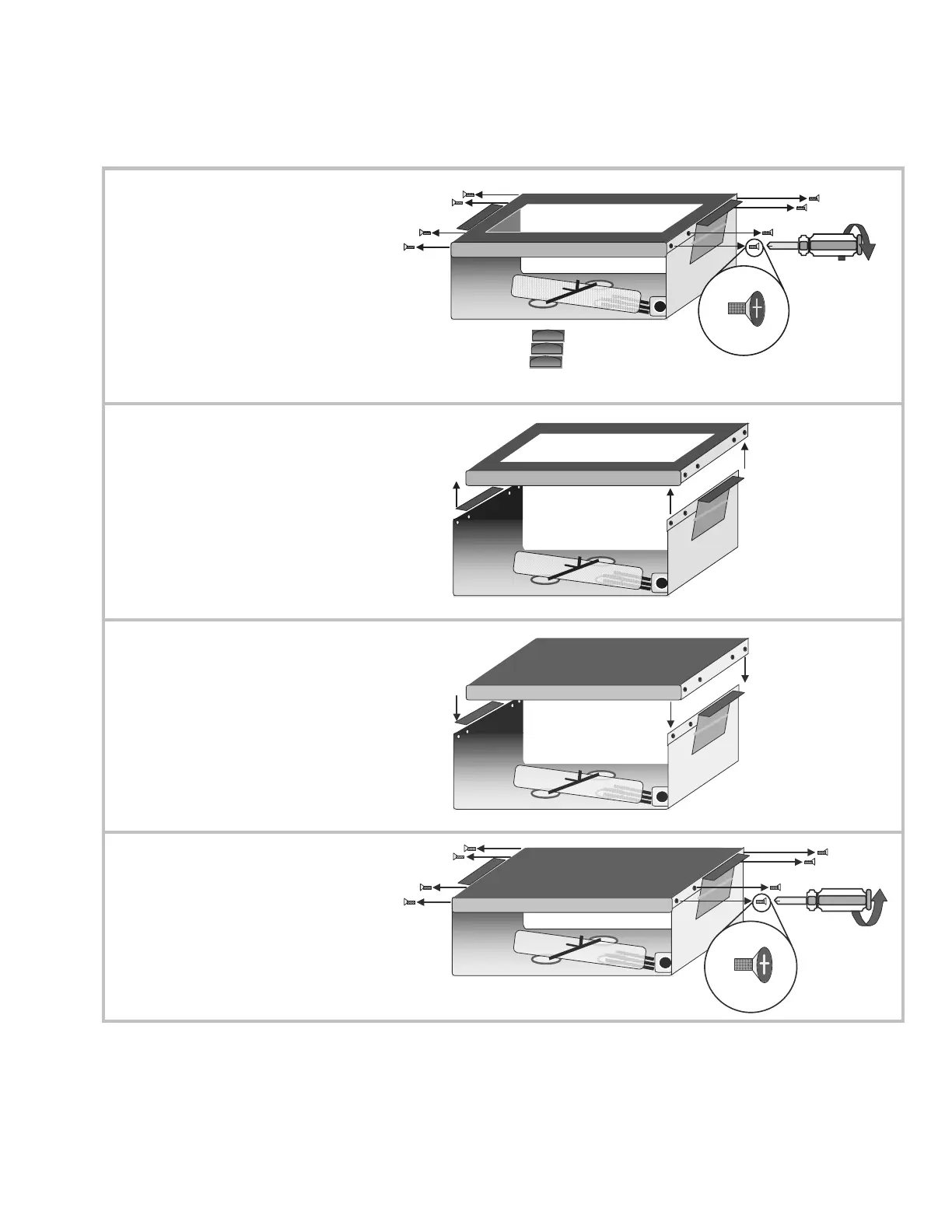
Installing a Blank Template into the DS-1
X
First locate the 8 screws
attaching the template
frame to the top of the DS-
1. There are 4 screws that
come in groups of 2 on
each side. Remove these
screws (and don’t lose
them!) using a properly
sized Phillips-head
screwdriver.
Y
Remove the template frame
of the DS- 1
Still got the screws?
Z
Replace the template frame
with a blank template
(Atomic Part # ATBLANK –
purchased separately).
Still got the screws?
[
Replace the 8 screws.
(Whew!) You can now load
the DS-1 into the Reactor
as usual *.
The Reactor is now ready
to be used with a Pro-rack
or foot controller style
modeler
*
NOTE! When bypassing the DS-1, the “RETURN” input on the rear jack panel of
the Reactor 112 should be used as the Reactor’s main input, (see pages 11-14).
Inserting a jack into the RETURN puts the Reactor in “Direct Mode” and
automatically cancels out the open audio cables from the DS-1.



 To Next Page