9
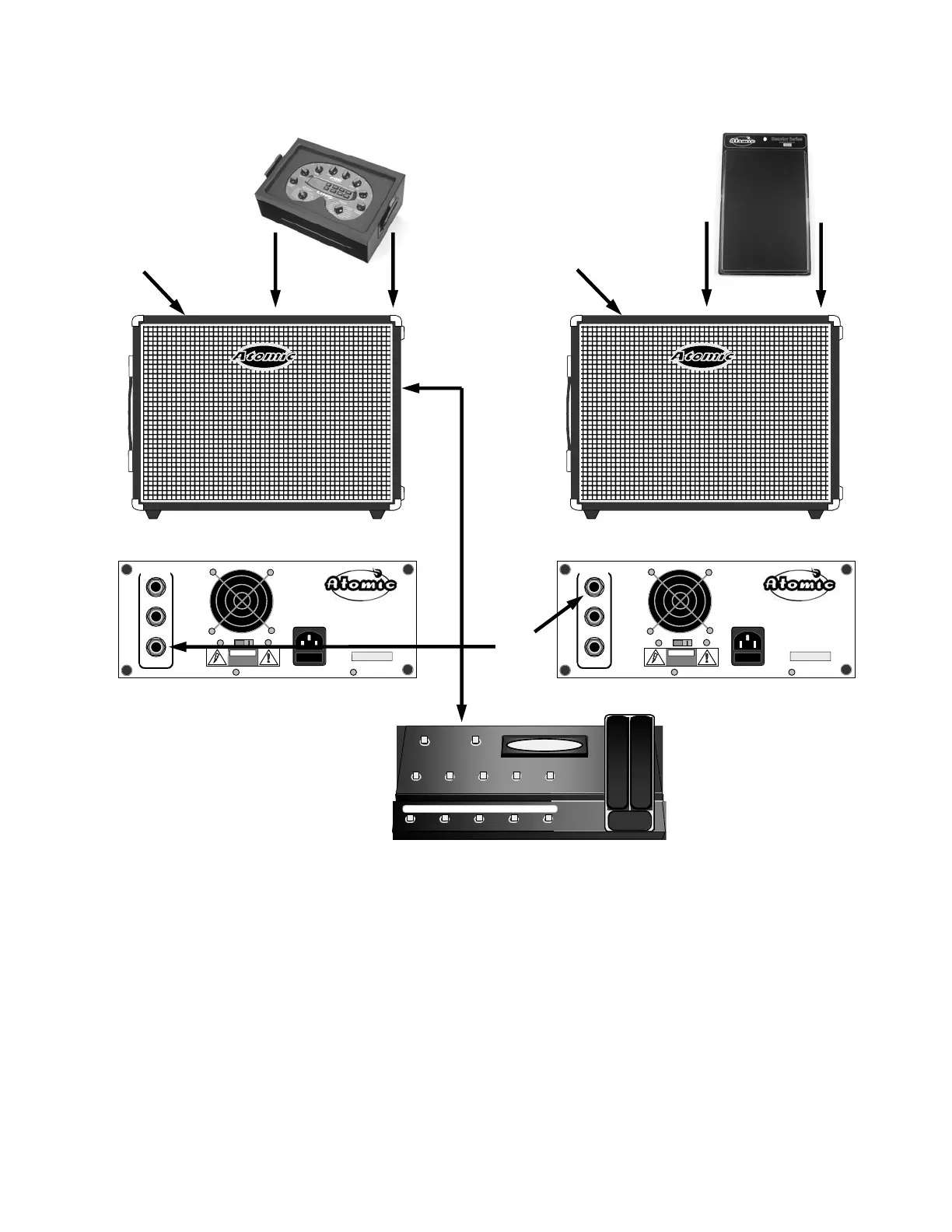
Desktop Modeler in Stereo
RETURN
SEND - L
EFFECTS
LOOP
SEND - R
MODEL REACTOR 11
Atomic Amplifiers LLC.
Orange CT.
FUSE
0101010101
!CAUTION!
RETURN
SEND - L
EFFECTS
LOOP
SEND - R
MODEL REACTOR 11
Atomic Amplifiers LLC.
Orange CT.
FUSE
0101010101
!CAUTION!
PLEASE NOTE!
*
If you wish to use a pair of
Reactors in MONO, simply
use the SEND – L output
instead of SEND – R.
X
After obtaining the proper
template load your modeler
into the DS-1 that comes
provided with your Reactor
112 (see page 8).
Y
Load the DS-1 into the
docking bay located in the
top of Reactor #1, making
sure that the dock locks
click into position.
Z
Install a blank template onto
the Reactor #2’s DS-1.
Then load the DS-1 back
into the Reactor.
(see page 10)
[
*
Run a standard shielded
1/4 inch cable from Reactor
#1’s Send R on the rear
panel to the Return on
Reactor #2’s rear panel.
\
If using a foot controller with
your modeler, connect it as
normal using the connector
access port located on the
rear of the reactor.
]
Turn on Reactor #1s
power switch (it should
light up). Your modeler
should power up at the
same time as the amp.
^
Turn on Reactor #2s power switch (it
should light up).
_
Bring up the levels on your modeler and switch
to some of your favorite presets.
Z
\
]
[
^



 To Next Page