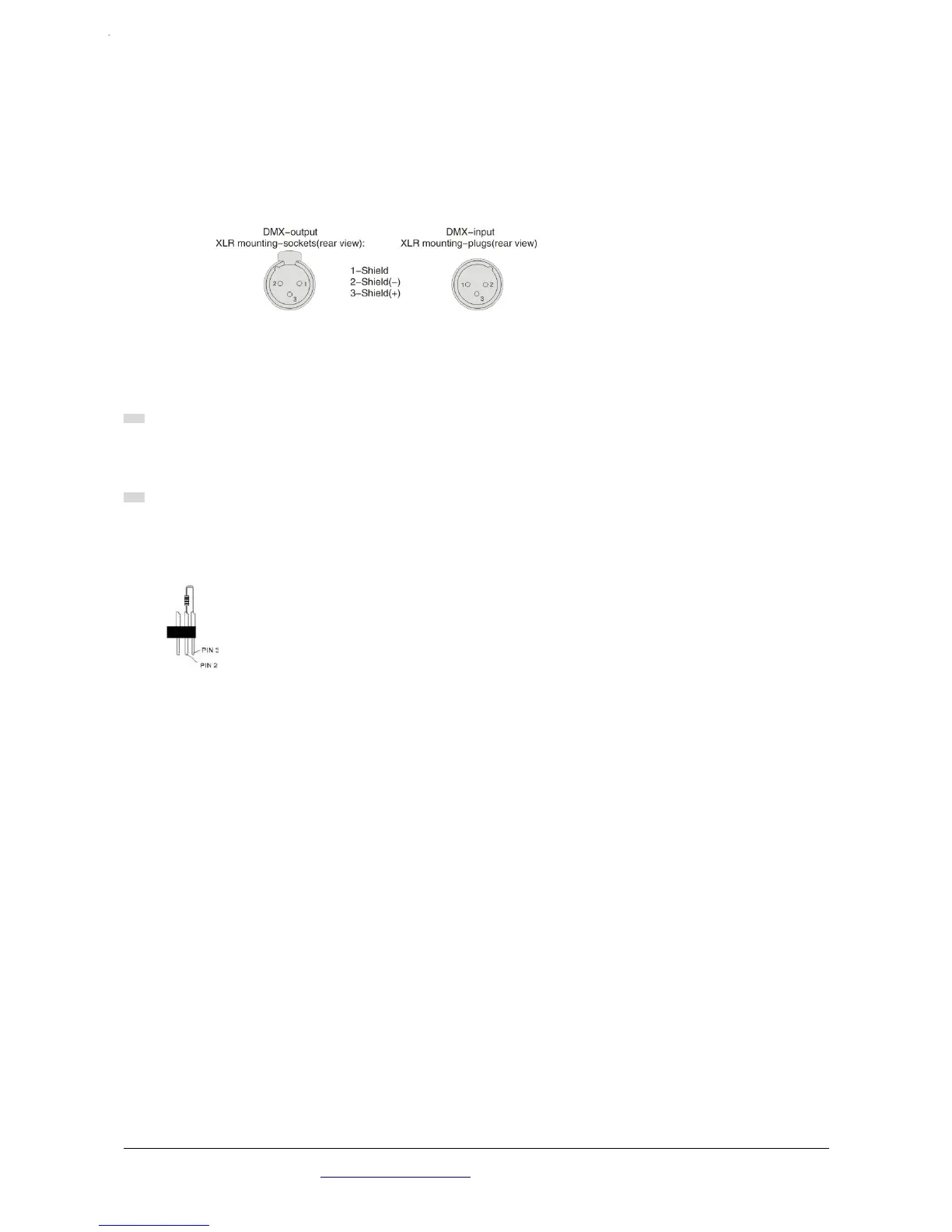
DMX-512 connection
Connection between laser lights and DMX must use the shied cable of diameter more than
0.5mm. Please use the attached 3 pin XLR plug/socket to connect the DMX output/input inter-
face. The connection between socket and cable as below( note the plug/socket’s 3 pin number
and position).
Note, XLR plug/socket’s 3pin can not be touched by inner hull, connection between pins is not
allowed. Except above connection, XLR plug/socket can not be connected with XLR control line.
Device receives international standard DMX512(1990) control signal.
When using standard DMX512 control signal, the last device’s output interface must be connec-
ted to a DMX plug. This plug is putting a 120 ohm resistance between “canon” plug’s 2 pin and 3
pin. Showing as below pic. Sticking this plug into the last device’s signal output interface, it will
avoid the interference during the process of signal transmission.
Atomic4Dj PLS4 Wireless – www.Atomic4Dj.com 6


 To Next Page