Page 24
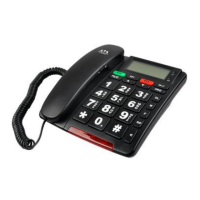
1.2 TELEPHONE AND CID FEATURES
• FSK/DTMF Emergency Talking Caller ID Speakerphone
• Languages Selectable: English / French / German /
Spanish / Italian / Hebrew
• Voice Reporting Selectable: English / French / German /
Spanish / Italian / Hebrew
• Up to 64 messages memory – Talking CallerID
• 22 digits for telephone numbers and 16 digits for name
display capable
• Built-in phonebook holds up to 30 numbers
• Real time clock display
• (2) one-touch memory buttons (M1 and 911)
• (5) levels of LCD contrast adjustment
• Flash time 100/300/600ms selectable
• Tone / Pulse selectable - In-use indicator
• Low and no battery indicator on display
(must install 4 AA Alkaline – not included)
• Ringer volume control
• Ringer light - Handset volume control (LO – HI)
• Speakerphone volume control
• LCD back light - External power: DC 9V 300mA adaptor
• Pendant operating frequency: 433.92 MHz
• Pendant battery: 23A 12V Alkaline
• Menu key ON/OFF switch control - Wall mountable
• Two programmable Daily Alarms with customizable alert
message to be played if Daily Alarm is missed.
• Telephone line failure message “TEL LINE FAILURE”
warning message displays along with blinking Red LED
light and beep alert.
• Power Failure “POWER OUT” warning message displays
along with blinking Red LED light and beep alert.
• Battery Low or Failure “LOW BAT” warning message
displays along with blinking Red LED light and beep alert.
Page 5
It is important that the receiving party of an emergency call
presses 0 to accept the call. If the emergency call is not
accepted, the telephone will call the next number from the
emergency number list.
NOTE: The system will continue to call the emergency contact
numbers, in sequence, over and over until someone accepts
the call or the call is terminated by the user.
After 1 minute 50 seconds, a beep tone will indicate the
emergency call will be terminated. The receiving party can
p r e s s 1 5 to add an extra 2 minutes to the call.
If the receiving party presses 1 5 during the emergency call (or
after 1 minutes 50 seconds to extend the call for another 2
minutes), the unit will not call the next number.
If the receiving party presses 1 9 during the emergency call,
the unit will not call the next number.
If the receiving party did not press 1 5 during the emergency
call after 1 minute 50 seconds, the unit will call the next
number from the emergency number list.
Each time a number is called, the system will dial for 1 minute.
If the system does not hear a receiver press 0 within 1 minute,
it will hang up and dial the next number.
NOTE: Calling can be stopped by pressing the Pendant button
again or the SOS button located on the phone
Page 22-26


 To Next Page
 Loading...