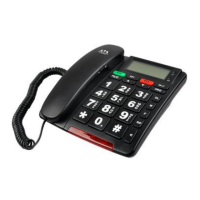
2 Buttons/connections (See picture)
1. LCD display
2. In-use Green LED
3. Low battery/No battery Red LED
4. Direct memory keys M1and 911(M2)
5. OK/dial key
6. Program key
7. Up/Down key
8. Delete key
9. Mute key
10. Flash key
11. Redial/Pause/Out call key
12. Handsfree key
13. Ringer LED
14. Numeric keypad
15. Phonebook/Caller ID list select key
16. SOS key
17. Hook switch
18. Line connection (RJ11)
19. Power adapter connection
20. Ringer volume switch/Local alarm volume switch
LO/HI
21. Battery compartment
22. Handsfree volume slide switch
23. Curl cord connection (RJ9)
24. Curl cord connection (RJ9)
25. Handset volume switch LO/HI
26. Wireless pendant
27. Pendant transmission LED
28. Pendant SOS button
29. Program key ON/OFF switch
Page 6
6.9 USING DIRECT MEMORY KEYS M1, 911
• Press M1 or 911
• Press to dial number, or
• Pick up handset or press for hands-free mode
• Press M1 or 911 to dial direct memory number
7 SOS FUNCTION
Read carefully how SOS works – 1.1 Emergency Features
7.1 ACTIVATE SOS FUNCTION
• Press and quickly release the Pendant button, or
• Press and hold SOS key on telephone for at least 3
seconds
NOTE:
If a Pendant or SOS key is accidentally pressed, pressing it
again with 15 seconds will deactivate and cancel the calling
of emergency contacts.
*If telephone receiver is off the hook, emergency system will
work with the wireless Pendant only
7.2 DEACTIVATE SOS FUNCTION
• Press the Pendant button
• Press SOS key on telephone
7.3 RECEIVING PARTY COMMANDS / KEY CODES


 To Next Page