USS Connection
Your Maxwell wi
ll
automatically switch to U
SB
mode
(Audio cue:
US
B) when a USB cable is
plugged into the port
on
your headphones with
an
active
da
ta connection.
USB
mode supports
24bi
t/
96khz lossless hi-res audio on compatible systems.
If you
wa
nt to charge your Maxwell Play Station
·w
hile using it in Bluetooth mode, you'll need
to
plug it in
to
a power only USB port like a wall wart charger (a USB
Co
ndom wi
ll
also work for
charging on sources
wi
th
a
da
ta connection).
AUX Connection
M
axvvell
will automatically
sw
itch
to
AUX mode when
an
AUX cable is plugged into the corr
ect
port on
yo
ur
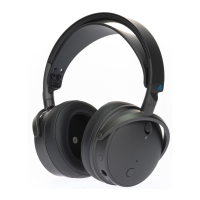
headphones. PLEASE NOTE: There are two AUX in ports on yo
ur
headphones,
the AUX in port is
the
one
at
the bottom
of
the headphones nearer to the
vo
lume wheels.
The
recessed port at the front
of
the headphones is for the Boom mic only.
Using the Wireless Dongle
When using your dongle on
your
preferred console, the switch on the side
of
the
dongle must be set to the appropriate setting
for
full functionality.
To
set the dongle,
unplug it from your source device and flip the switch to PS
or
Xbox (depending on
the version you own) and plug it back in. Your Maxwell will automatically reconnect
to the dongle
if
it's detected (Audio cue: USB Dongle
).
To
pair a
new
dongle
or
re-pair an existing
one
to
your
headset (as
of
firmware
version 32):
1. Insert dongle into a source device
2.
Insert a paperclip into the small hole on the side
of
the dongle and press the
button down until the LED on the dongle begins to flash (you'll feel a slight
click when pressing).
3. Once the LED begins to flash, press hold the Noise Reduction button on the
front
of
your
headphones, and while that button
is
held down, press the
power button three times. Your headphones will power cycle and pair to the
dongle on the next boot.


 To Next Page
 Loading...