Simultaneous Audio
Your Maxwell chooses its connection automatically based
on
available connection types. If a
wired
co
nnection source is active w
hi
le using Maxwell via Bluetooth, it will attempt to play
through both audio sources. Please note that simultaneous audio through any connection
type while a Dongle connection is active,
or
through two simultaneous wired connections
(USB+AUX)
is
not
possible.
Note on charging while using the dongle: The USB dongle must be unplugged before the
USB cable wi
ll
functi
on
via wired connectio
n.
If you wish
to
charge your Maxwell whi
le
wired
USB
wh
ile listening to a dongle source, the USB cable must be plugged
in
to its wired source
BEF
OR
E you plug in the dongle. You can also use a USB condom or a power-only (no data)
usb charging
br
ick.
PlayStation Setup
Maxwell is compatible on PS4 and PS5 using the
USB
Dongle (into the console USB
ports), wired USB connection (into the console USB ports),
or
via 3.5mm
AUX
connection (into the controller). On PS5, you can connect the dongle or cable via the
USB-C port on
the
front
or
any USB-A port using the included adapter.
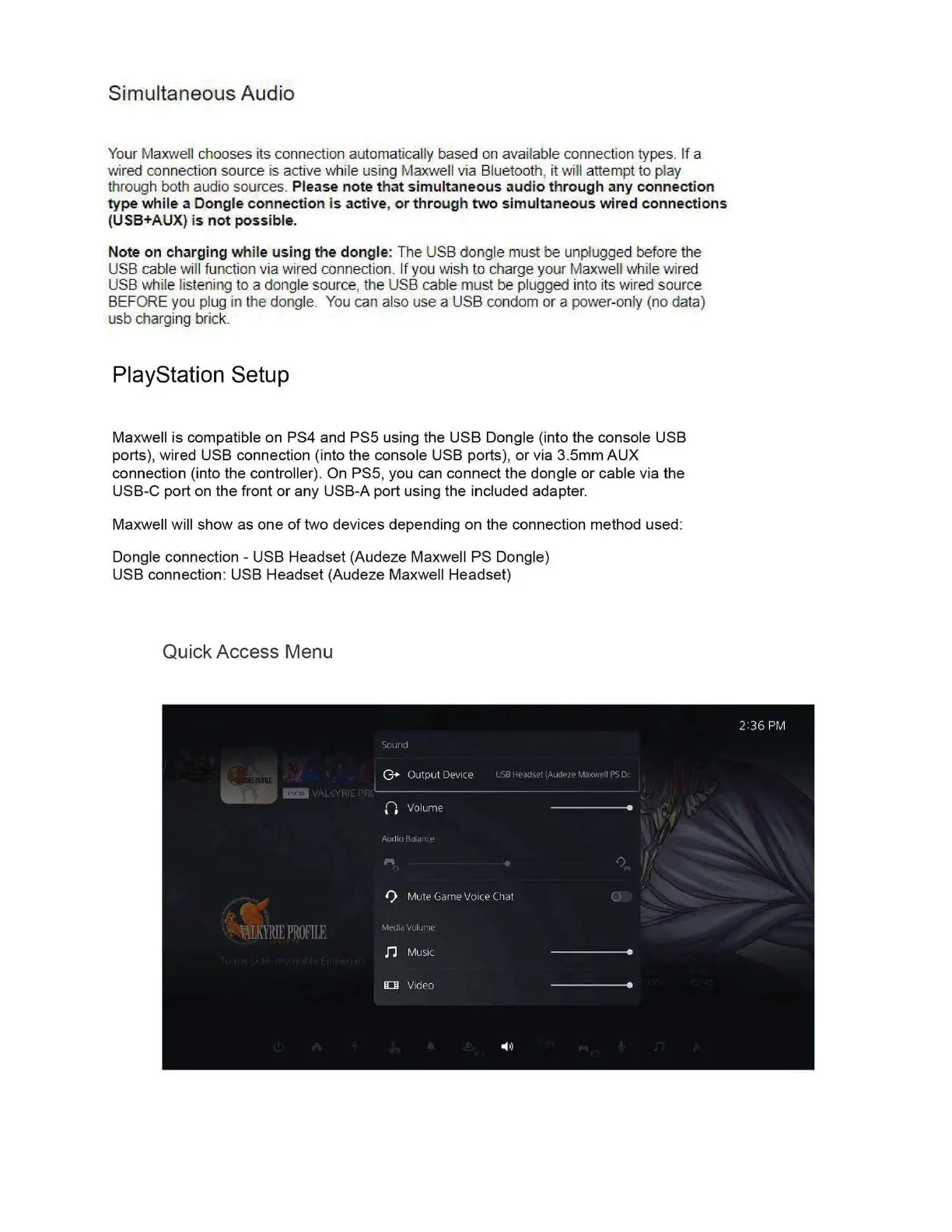
Maxwell will show as one
of
two devices depending on the connection method used:
Dongle connection - USB Headset (Audeze Maxwell PS Dongle)
USB
connection: USB Headset (Audeze Maxwell Headset)
Quick Access Menu


 To Next Page