EasyManua.ls Logo

Audeze Maxwell - Function Guide

Audeze Maxwell
24 pages
Print Icon
To Next Page IconTo Next Page
To Previous Page IconTo Previous Page
Loading...
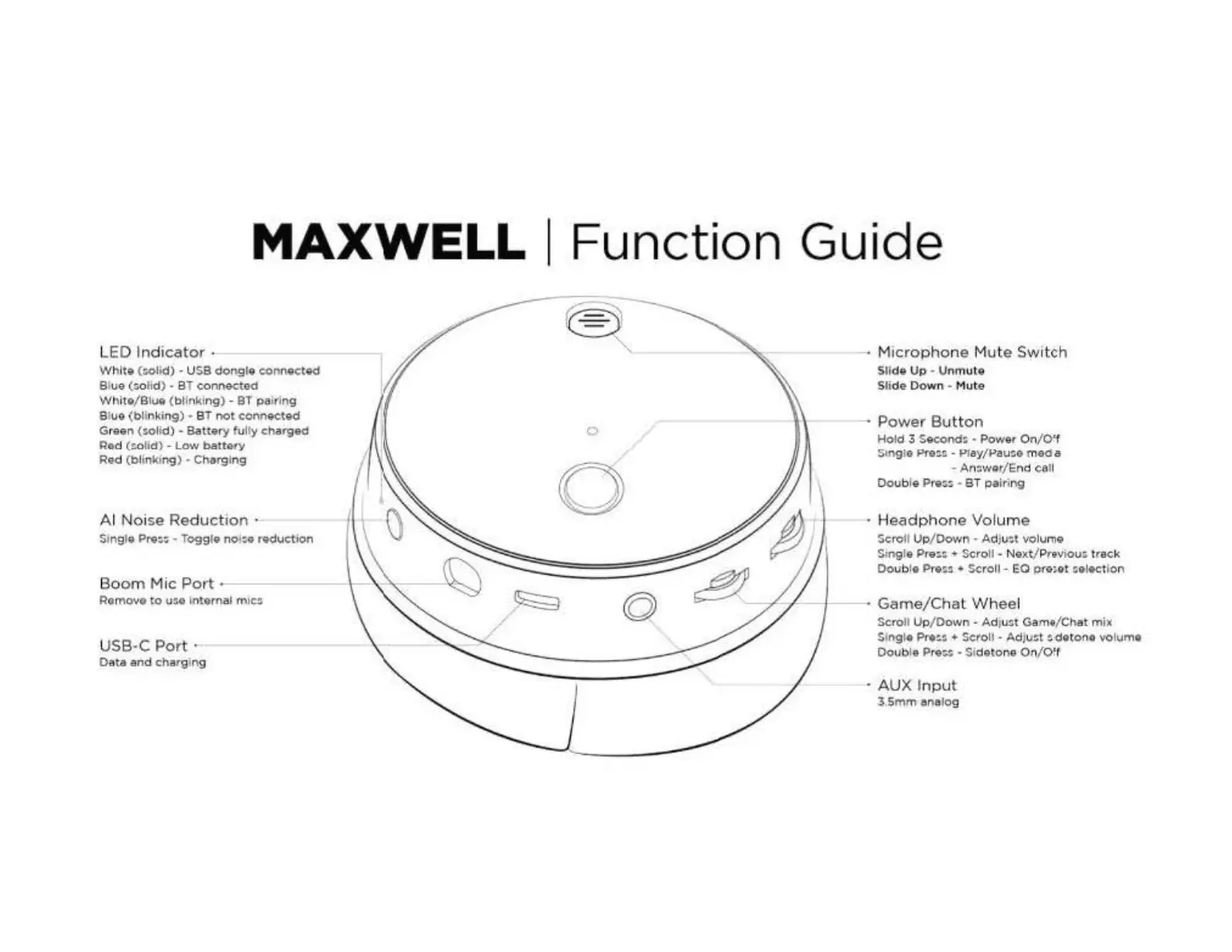
MAXWELL
I Function Guide
LED
Indicator
Whit•
(:»ltd)
us.a
dongle
eonn-ected
Slue
(:;.
o
li
d) BT
connected
White/Blue
(
bllnk
l
ng
) -
8T
pa
iri
ng
Slue (bllnkin,g)
8T
not
ecnn.etoc:I
Green
{s
olkt)
-
Battery
fulty char.gad
Red
(~otld)
-
t.ow
batlOty
Red
(blinki
ng)
Charg
J
n9
Al
No
ise
Reduction
·
Single
Pre::
Togglo
nOia
reduction
Boom
Mic
Port
--
Romove
to
t1so
In
ternal
m1c:i
U
SB·C
Port·
D
ata
and
chargmg
0
0
M
icro
phone
Mute Switch
Slid
Up
Vnm
ute
Slide
Down
Mut
e
Power
Bu
tton
Hold
3
Second;
Power
On/O'f
St.ngle Pre~~ . Pl
ay
/Pau:.a
me
d a
-
An::.wor/End
call
Doub
le Pre:.:. ·
BT
pairing
H
eadphone
Vol
um
e
Sc;r'Of
l Up
/Down
Adw:.t
voh,;rnq
St
ng!e
Pre:.:;. + S<::roll -
Ne
xt/Previou:.
t
rack
Oou
b!e
Pr•~
Scroll
- EQ P(e;.et !.e!.c:tl
on
Game/Cha
t
Whee
l
Scro
U Up
/Down
-
Ad
J
u:t
Gam•
/
Chat
m
ix
Sl
ngl•
Pree:: + Scroll - Ad
JV~
~
de
tono volume
Dou
b
le
Pre
:;.:
• Si
detone
On
/
Of
f
AUX
I
nput
1,
5mm
al')aJog