G.ame/Chat mix
er
M
aX\,vell
features an
on-board
game/d1at mi
xer
whee
l
for
us
e on c
om
patib
le
pla
tf
orms
_ F
or
Xbox
, the
game
/chat
mixer
is integrated in
to
the con
so
le's party chat feature
and
wi
ll
work
out
of
the box. F
or
PC a
nd
Mac, the
cha
t mi
xer
wheel u
ses
two
endpoint au
dio
devices
to
sep
a
ra
te the
game
and
cha
t channels
for
individ
ua
l
co
ntro
l.
System >
Sound
~i
i Cho01
c,
,-r1
eietopa,soi,r,,:I
:-.-•
-•('"-....,
,,._
.•
',...aaoo.••---·
l
11plill
, , Spc•
ler.
.n
.1.·
.__::.
_!'
M -
,
lso.>
ltM D gi
t.>
. Ou'!pu1
r-
'1
J C
.:a
1
LG
LLTAAG
EAA
- I Sp
11~
~A1'l
• l
,l
fj
Ga
me
Chat
J)
Cl,c,o,
.,
o J
..,
x ..
lo•
>
JJ<
J
;,._
en
•
l!Co•dir,,;i
-'rr
..
-r-
..
~~
..
-• r ·--""Q•
□
X
Oft.
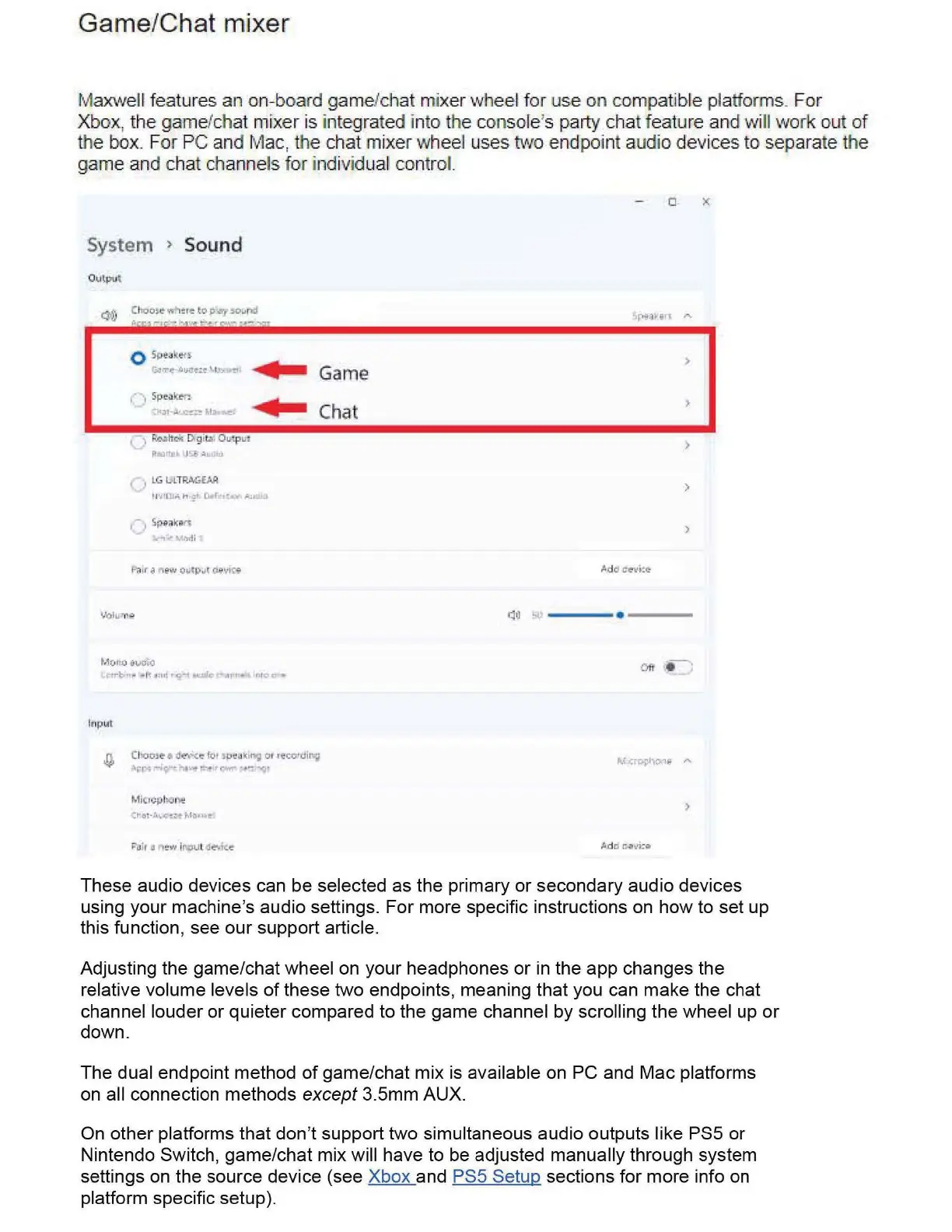
These audio devices can
be
selected as
the
primary
or
secondary audio devices
using your machine's audio settings.
For
more specific instructions on
how
to set
up
this function, see
our
support article_
Adjusting the game/chat wheel on your headphones
or
in the
app
changes
the
relati
ve
volume levels
of
these
two
endpoints, meaning
that
you can
make
the chat
channel louder
or
quieter
compared to the game channel
by
scrolling
the
wheel up
or
down.
The
dual endpoint method
of
game/chat mix is available on PC and
Mac
platforms
on all connection methods except 3.5mm
AUX
.
On
other
platforms
that
don't support two simultaneous audio outputs like PS5
or
Nintendo Switch,
game
/
chat
mix
will have to be adjusted manually through system
settings on
the
source device (see Xbox and PS5 Setup sections
for
more info on
platform specific setup)-


 To Next Page