Advanced Bluetooth Function
LC3 and LDAC Codecs
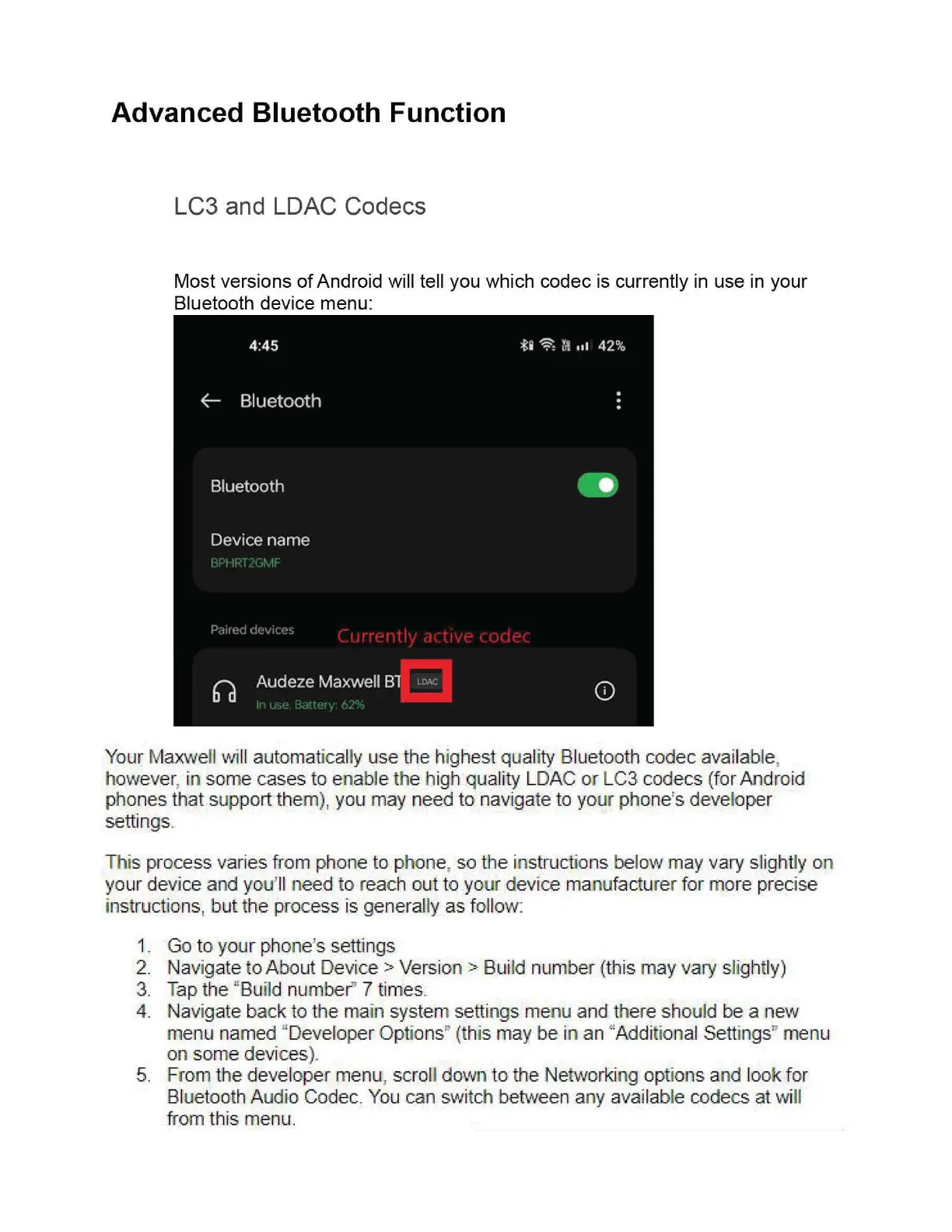
Most versions
of
Android will tell you which codec is currently in use
in
your
Bluetooth device menu:
Your Maxwell will automatically use the highest quality Bluetooth codec available,
however, in some cases to enable
th
e high quality LDAC or LC3 codecs (for Android
phones that support them
),
you may need
to
navigate to
yo
ur phone's developer
settings.
This process varies from phone to phone, so the instructions below may vary slightly on
your device and you'll need
to
reach out to your d
ev
ice manufacturer for more precise
instructions, b
ut
the process is generally as foll
ow
1. Go
to
your phone's settings
2.
Navigate to.About Devi.
ce
>Vers
io
n>
Build number (this may vary slightly)
3. T
ap
the "
Bu
ild numbe
r"
7 times.
4.
Navigate back to the main system settings menu and there should be a new
menu named "Develop
er
Options" (this may
be
in an "Additional Settin
gs
" menu
on some devices
).
5. From the developer menu, scroll
dow
n
to
the
Ne
tw
orking
op
tions and look for
Bl
uetooth Audio Codec. You can switch between any
av
ailable co
dec
s
at
will
from this
me
nu.


 To Next Page