1 5 0 Pa rk in g sy stems
Top view
App lies to vehicles: with Audi parking system plus with
front- and rearview camera
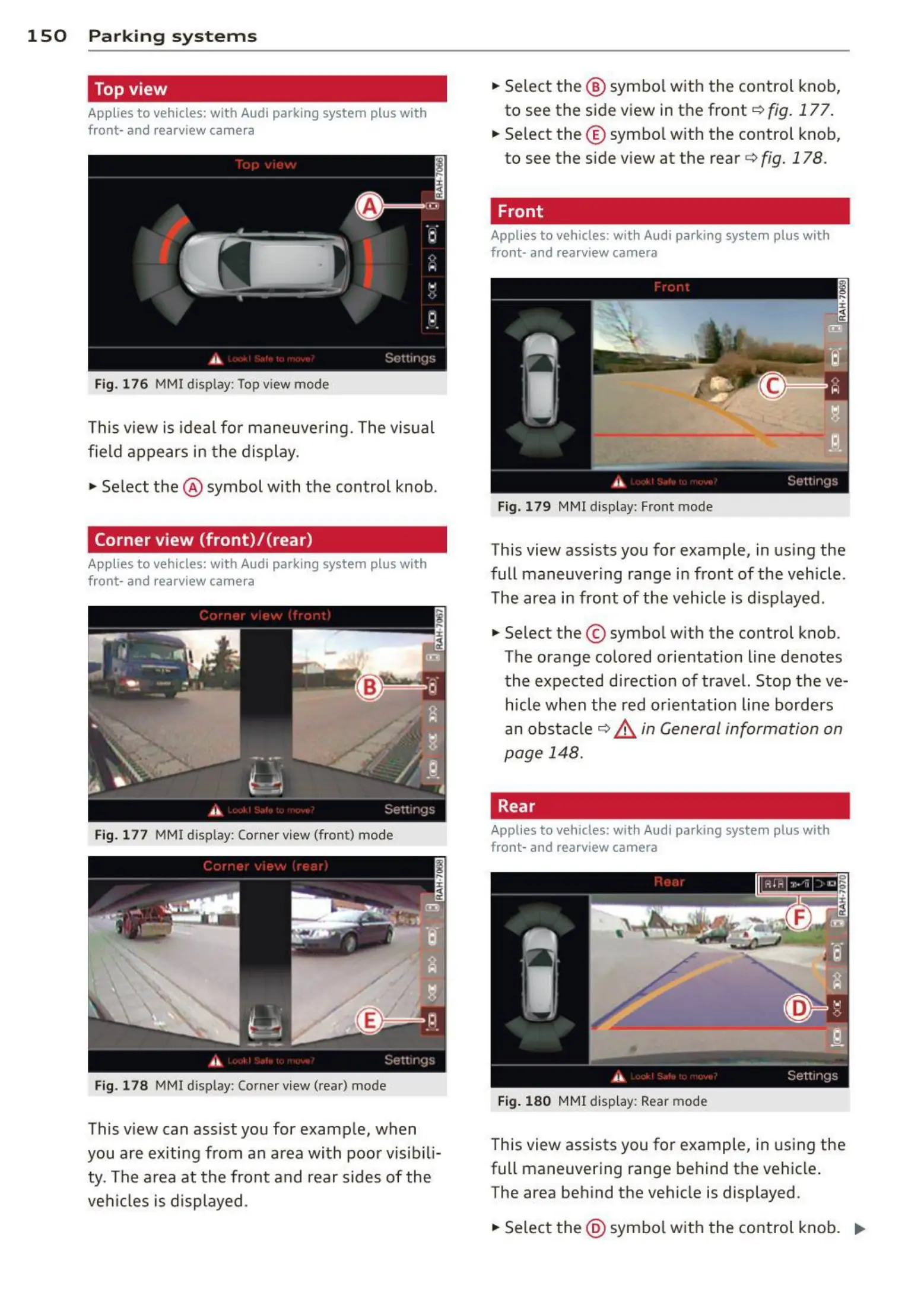
Fig. 176 MMI display: Top view mode
This view is ideal for maneuvering. The visual
field appears in the display .
.,. Select the @ symbol with the control knob.
Corner view (front)/{rear)
Appl ies to vehicles: with Audi parking system plus with
front- and rearview camera
Fig . 177 MMI display: Corner view (fron t) mode
Fig. 178 MMI display: Corner view (rear) mode
This view can ass ist you for example, when
you are exiting from an a rea with poor vis ibili-
ty. The area at the front and rear sides of the
veh icles is displayed .
.,. Select the @ symbo l with the control knob,
to see the side view in the front
c::> fig. 177.
.,. Select the © symbo l with the control knob,
to see the s ide view at the rear
c::> fig. 178.
Front
Applies to vehicles: wit h Audi parking system plus with
front- and rearview camera
Fig. 179 MMI display: Front mode
This view assists you for example, in us ing the
full maneuvering range in front of the vehicle .
The area in front of the vehicle is disp layed .
.,. Select the © symbo l with the control knob .
The orange colored orientation Line denotes
the expected direction of travel. Stop the ve-
hicle when the red orientation Line borders
an obstacle c::> & in General information on
page 148.
Rear
Applies to vehicles: wit h Audi parking system plus with
front - and rearview camera
Fig. 180 MMl disp lay: Rear mo de
This view assists you for example, in using the
full maneuvering range behind the vehicle .
The area behind the vehicle is displayed.
.,. Sele ct the @ symbo l with the control knob . ..,.


 To Next Page