
 Need help?
Do you have a question about the Audient Sono and is the answer not in the manual?
Provides critical safety instructions and warnings for operating the Sono device.
Detailed safety guidelines and warnings to prevent hazards during use.
Instructions for downloading and installing the Sono software on macOS.
Instructions for downloading and installing the Sono driver on Windows.
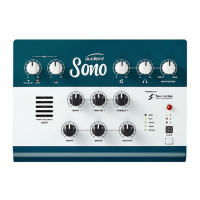
Introduction to the dedicated guitar channel featuring a 12AX7 valve and tone controls.
Detailed explanation of the guitar channel's design and interaction with various guitar types.
Explains the function and saturation capabilities of the 12AX7 valve stages.
Describes the onboard power amp and cabinet simulation from Two Notes.
Details the three hardware presets for storing Two Notes settings for quick access.
Describes the two Audient console mic preamps and their gain controls.
Independent control over monitor and headphone output levels.
Illustrates how the input signal is routed through the Sono device.
Shows the different paths for outputting audio from the Sono interface.
Details the components and operation of the Digital Signal Processor mixer for monitoring.
Introduction to the Sono application for controlling advanced features like cue mixes.
Overview of the Torpedo Remote software for adjusting cabinet simulation and other parameters.
Introduction to the Two Notes Torpedo Remote software for cabinet simulation.
Explains the main components and functions of the Torpedo Remote application interface.
Steps for logging in, signing up, and registering the Sono with the Torpedo software.
Guide on selecting and experimenting with different cabinet models for tone shaping.
Details on selecting different microphone types and their impact on the sound.
Explains how microphone distance affects the direct sound versus room reverb.
Guide on selecting acoustic environments to realistically capture the cabinet sound.
Details on adjusting Power Amp saturation and Contour settings for tone shaping.
Explains the Tone control for selecting between bright, dark, or in-between tonal characteristics.
Instructions for saving custom tones to onboard presets or the computer.
Details on accessing the cabinet manager to view and store cabinets onto the Sono.
Instructions for setting up and using Sono with Pro Tools for recording.
Instructions for setting up and using Sono with Logic Pro for recording.
Instructions for setting up and using Sono with Cubase or Nuendo.
 General
| Type | Audio Interface |
|---|---|
| Sample Rate | Up to 96kHz |
| Bit Depth | 24-bit |
| Phantom Power | Yes |
| USB | USB-C |
| Guitar Preamp | Yes |
| Inputs | 2 x XLR/TRS combo |
| Outputs | 2 x TRS |

 To Next Page