18
ENGLISH
X-OVER
LP HP FULL
OFF VOX DC
LEVEL
INPUT
MIN
L R L R
MAX
AUTO
TURN-ON
INPUT OUTPUT
Q S–TWO
+12V REM
IN/OUT
GND
POWER
L
L
R
R
BRIDGED
PROTECT
SPEAKER
OUTPUT
POWER
INPUT
FUNCTIONAL INSTRUCTIONS
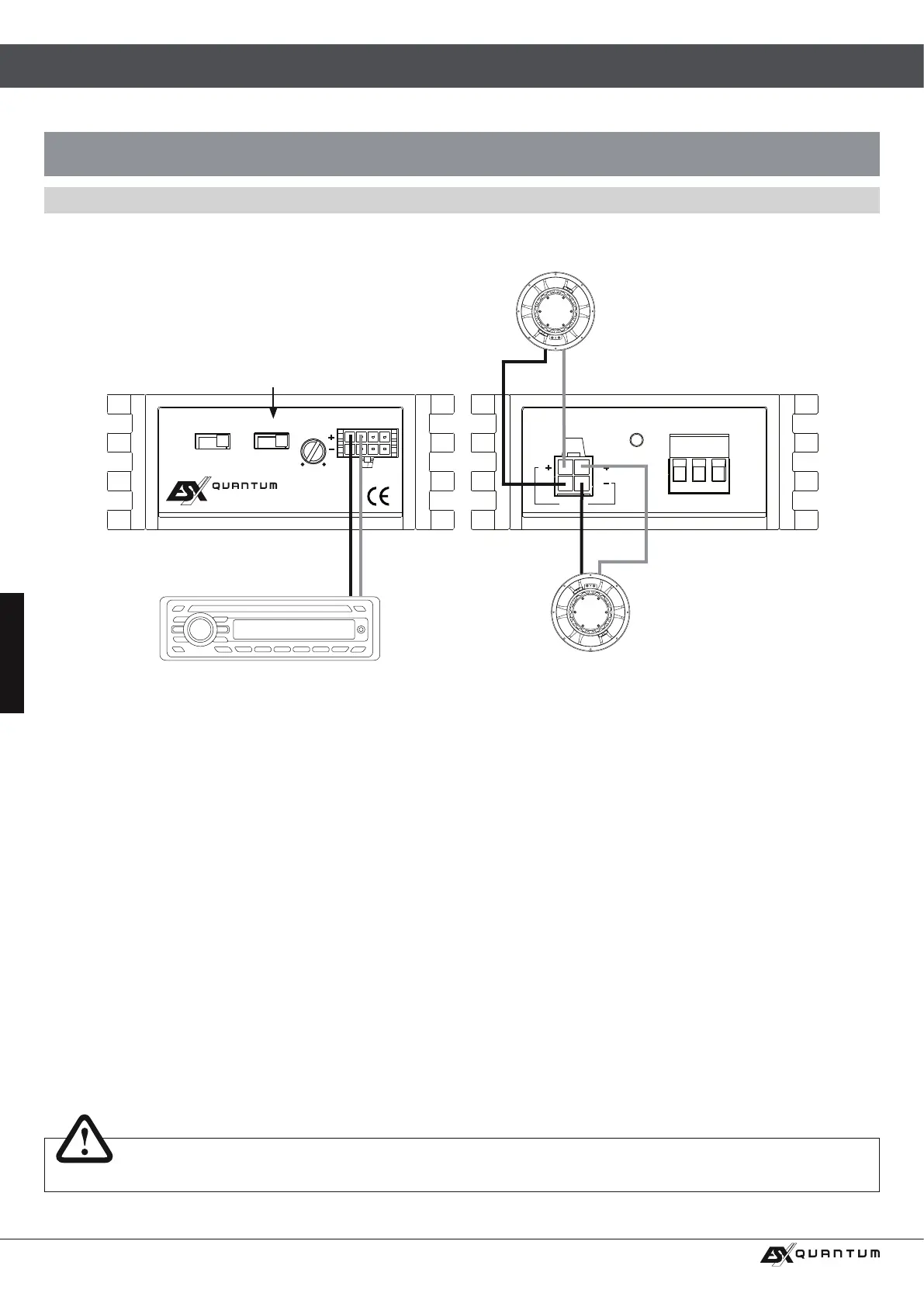
INTERCONNECTION EXAMPLE
2-channel-mode: 1 x Stereo-System (Front or Rear)
INTERCONNECTION
• Connect the RCA outputs of the head unit with the RCA jacks INPUT (L /R) of the amplier with appropriate high-value RCA cables
by using the included wire harness.
• Connect the speakers with the SPEAKER OUTPUTS by using the included wire harness.
• Always ensure that the total impedance load on the speaker outputs is not lower than 2 ohms.
Too low impedance cause high temperature and will shut down the amplier operation.
• Always ensure the correct polarity of the speakers. The interchange of plus and minus cause total loss of bass playback and could
damage the speakers.
CROSSOVER SETTINGS
• When using bigger speakers (more than 20 cm) set the X-OVER switch to the FULL position (Full Range Signal).
• When using smaller speakers (8.7 cm - 16 cm) set the X-OVER switch to the HP position (Highpass Mode) to avoid any damage
by lower frequencies on the speakers. The cut-off frequency is xed at 80 Hz.
LEVEL CONTROLLER
• Turn the LEVEL INPUT controller of the amplier to the MIN position.
• Turn the volume controller of the head unit to 80 - 90% of its full setting.
• Turn the LEVEL INPUT controller clockwise until you hear some distortion.
• Then turn back the LEVEL INPUT controller slightly until you hear a cleaner sound.
Do not connect loudspeaker cables with the vehicle’s chassis. Always ensure the correct polarity of all connections.
NOTE
HP or. FULL
Connect stereo RCA outputs (FL/FR or RL/RR)
of the head unit with INPUT L / R
of the amplier
Loudspeaker left
2 – 8 Ohms
Loudspeaker right
2 – 8 Ohms



 To Next Page