The amplifier is shipped without the valves installed. It is necessary to install all
valves before the amplifier can be connected to the mains supply and operated.
It is essential that the valves are installed correctly or serious damage that is
not covered by the warranty will result. We recommend that your dealer
perform this procedure for you if you are in any way unsure.
FIRSTLY, ENSURE THAT THE AMPLIFIER IS NOT CONNECTED TO A
MAINS ELECTRICAL SUPPLY, AND THAT THE POWER CORD IS NOT
CONNECTED TO THE AMPLIFIER.
Carefully unwrap all valves.
For reference, the supplied valves are as follows: -
Socket 1 – EL34
Socket 2 – EL34
Socket 3 – EL34
Socket 4 – EL34
Socket 5 – 5670
Socket 6 – 5670
Socket 7 – 6AU6
Socket 8 – 6AU6
Once again, please understand that it is absolutely vital these valves are
fitted correctly.
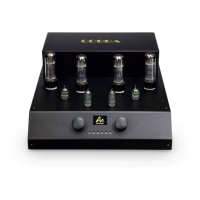
Look at the drawing of the COBRA on the next page and familiarize yourself with the
positions of the various valves. First install the EL34 valves, which should be
inserted into sockets ‘1’, ‘2’, ‘3’ and ‘4’. Locate the rib on the central pin of the valve
base and align with the valve socket (it can only be inserted one way due to this
locating rib) and with gentle but firm pressure insert the valve.
Next, insert the four small signal valves into the front four sockets.
Looking from the front of the amplifier, insert the shorter 5670 valves into the outer
sockets ‘5’ and ‘6’, and the taller 6AU6 valves into the inner sockets ‘7’ and ‘8’. The
valves can only be inserted one way.
Check once again that all valves are correctly installed.



 To Next Page