6
Preface
Please take time to carefully read and understand
the following instructions before you install or
attempt to operate your Audio Research Reference
10 preamplier. Becoming familiar with the product
and its correct operating procedures will help assure
you of maximum musical enjoyment and reliable
operation. The effort you invest now will be well
rewarded in the years ahead.
Warnings
1. To prevent re or shock hazard, do not expose
this product to rain or moisture.
2. This unit operates on voltages which can cause
serious injury or death. Do not operate with
covers removed. Any necessary servicing
should be carried out by your authorized Audio
Research dealer or other qualied electronics
technician.
3. The power cord supplied with this unit is safety-
tested and is equipped with a proper grounding
plug. If used normally, it will provide a safe
earth ground connection of the chassis. Defeat
of the grounding plug or use of a power cord
without a grounding plug, or any unauthorized
modication of the active circuitry or controls of
this unit, automatically voids warranty coverage,
and could cause injury or death.
4. For safe operation and protection against re
hazard, replace fuses only with those of the same
type and rating as those supplied with this unit.
Packaging
Save all packaging accompanying this product.
You have purchased a precision electronic
instrument, and it should be properly cartoned any
time shipment becomes necessary. It is very possible
that this unit could be damaged during shipment if
repackaged in cartoning other than that designed
for it. The original packaging materials help protect
your investment from unnecessary damage, delay
and added expense whenever shipment of this unit
is required.
DO NOT ATTEMPT TO OPERATE THIS EQUIPMENT
BEFORE INSTALLING THE NUMBERED VACUUM TUBES
IN THEIR RESPECTIVE SOCKETS.
Installation of Vacuum Tubes
This unit has been shipped with the vacuum tubes
installed in protective foam in a separate box
packed inside the shipping carton. Remove the
tubes carefully from the protective foam. Using a
phillips-head screwdriver to loosen the fastening
screws, remove the top cover and set aside.
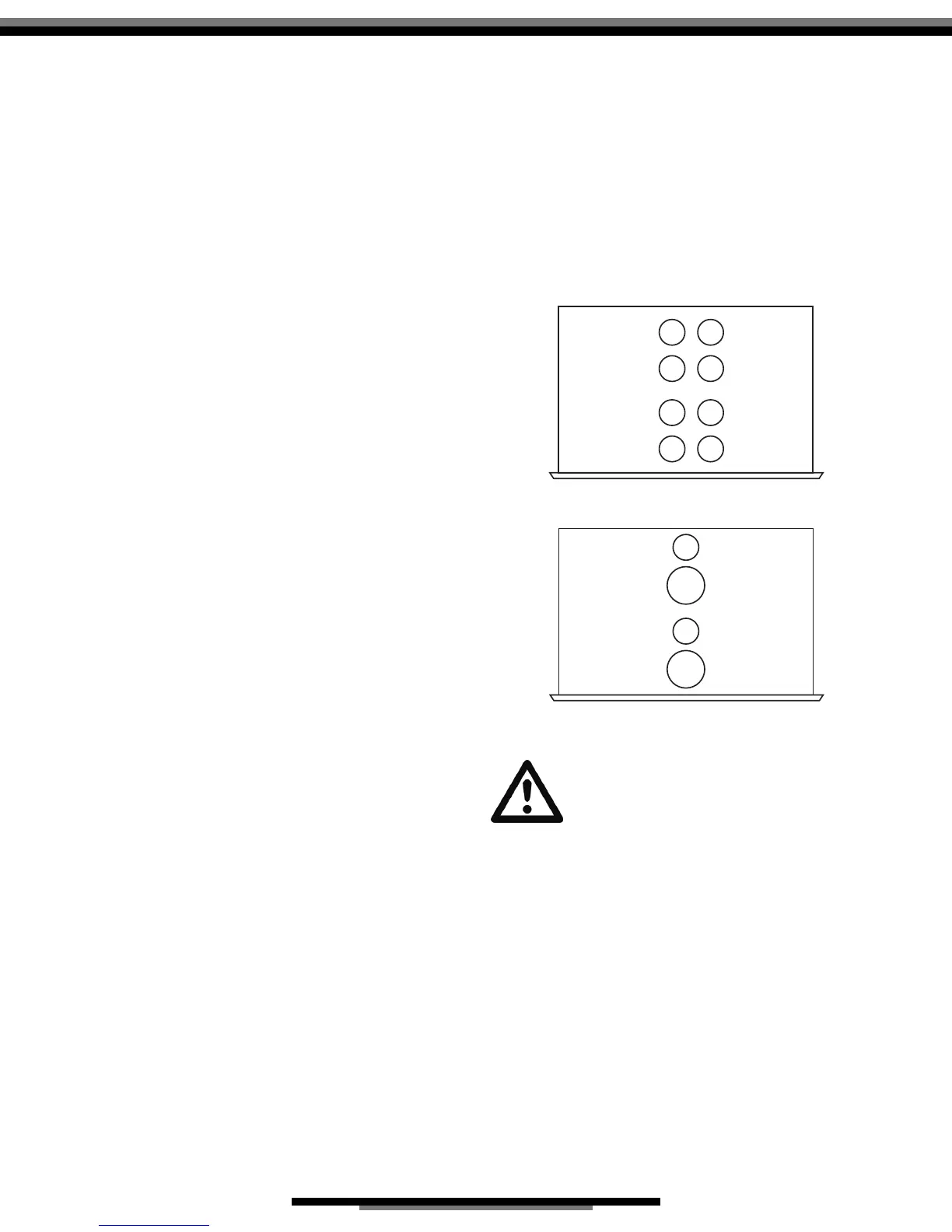
After removing the top cover and the vacuum tubes
packed in protective foam, see the accompanying
illustrated sheet (g. 1 + 2) for instructions on installing
the tubes for your Reference 10 in their proper
locations in the power supply and audio chassis. Note
that the numbers written on each tube correspond
to a ‘V’ number printed on the circuit board next to
each tube socket. Insert each tube rmly, carefully
aligning the tube pins with the corresponding socket
holes.
Do not attempt to install or remove any
vacuum tubes unless this unit is turned off
and disconnected from the A.C. power
outlet. Unit should be connected to the
A.C. outlet and turned on only after all vacuum
tubes have been installed and appropriate panels
have been replaced and fastened. See owner’s
manual for installation instructions.
Before replacing vacuum tubes, turn off unit,
disconnect from A.C. outlet and allow installed tubes
to cool before attempting to remove them. Hot
tubes may cause burns or other injury if not allowed
to cool before removal.
When removing or installing tubes, do not touch tube
socket contacts or other components as the circuit
may retain sufcient levels of voltage and current to
cause injury or death.
Contact your dealer or Audio Research Customer
Service (763-577-9700) if you have any questions
about installing or replacing vacuum tubes in this
unit.
V1V5
V7 V3
V2V6
V8 V4
TOP VIEW
AUDIO UNIT
g. 1
V9
TOP VIEW
POWER SUPPLY
UNIT
V10
V11
V12
g. 2


 To Next Page