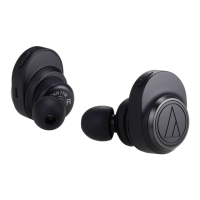
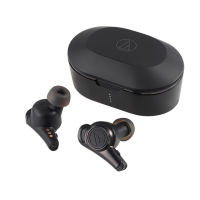
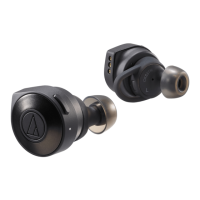
The Audio-Technica ATH-CKS5TW are wireless headphones designed for a comfortable and immersive audio experience. They come with a charging case that not only protects the headphones but also recharges them on the go. The product is designed for safe use, and users are advised to read the Quick Start Guide and Caution Guide, along with the user manual, to ensure proper operation.
Function Description
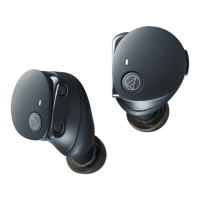
The ATH-CKS5TW headphones utilize Bluetooth wireless technology to connect to a variety of devices, enabling users to play music, receive phone calls, and more. The headphones feature multifunction buttons on both the left (L) and right (R) sides. The R-side button controls power ON/OFF, music playback (play/pause, skip forward, skip back), and phone call management (answer/end, reject calls). The L-side button is dedicated to volume control (volume up/down). A protrusion on the L-side button helps distinguish it from the R-side.
Indicator lamps on each headphone display the operating status and battery level, while charging indicator lamps on the case show the case's battery level. The R (right) headphone also provides English voice guidance for various situations, such as "Power on," "Power off," "Bluetooth connected," "Bluetooth disconnected," and "Low battery."
The charging case is integral to the product's functionality, housing a rechargeable lithium polymer battery that charges the headphones' internal lithium-ion batteries. The headphones can be charged by simply placing them in the case and closing the cover. The case itself is charged via an included USB Type-A to USB Type-C charging cable, connecting to a computer or other USB power source.
For enhanced user experience, Audio-Technica offers a dedicated smartphone app (CONNECT App for iOS and Android) that provides more convenient control and settings adjustments for the product.
Usage Features
- Power Management: The headphones automatically turn on when removed from the charging case and turn off when placed back inside. Alternatively, users can manually turn them on or off by pressing and holding the multifunction buttons. The product also features an auto power-off function, turning off after 5 minutes of not being connected to a device.
- Pairing and Connection: To connect to a Bluetooth device, the headphones must first be paired. This involves removing them from the charging case, initiating the pairing process on the Bluetooth device, and selecting "ATH-CKS5TW" from the list of available devices. Once paired, the headphones will automatically connect to the previously connected Bluetooth device when powered on. The product supports multipairing, saving connection history for multiple devices. If switching between devices or encountering pairing issues, users can reset the pairing state by placing the headphones in the charging case and pressing and holding the R-side multifunction button for about 6 seconds until the indicator lamp lights red, indicating a "searching for devices" state.
- Wearing Comfort: The headphones come with 3D loop supports and silicone rings in four sizes (XS, S, M, L) to ensure a stable and comfortable fit. The M-size eartips are pre-attached. Users are advised to select the eartip size that provides a snug fit for optimal sound quality, especially for bass reproduction. The 3D loop supports are designed to be slightly bent when worn to enhance stability.
- Music Playback: Music playback controls (play/pause, skip forward, skip back) are managed via the R-side multifunction button. Volume adjustments are made using the L-side multifunction button.
- Phone Calls: The headphones support telephone features, allowing users to answer, end, or reject calls using the R-side multifunction button. During a call, users can switch the call between their mobile phone and the product by pressing and holding the R-side button.
- Water Resistance: The headphones have a water-resistant (drip-proof) rating equivalent to IPX2, meaning they are protected against water droplets falling from above at a 15-degree angle. This protects them from rain but does not make them waterproof, so submerging them in water should be avoided. The charging case is not water-resistant.
- Troubleshooting: The manual provides solutions for common issues such as power failure, inability to pair, sound distortion or cuts, and headphones not connecting. A reset function is available for persistent malfunctions, which involves disconnecting and reconnecting the USB charging cable to the charging case.
Maintenance Features
- Regular Cleaning: To ensure longevity, the product should be cleaned regularly with a dry cloth. Alcohol, paint thinners, or other solvents should not be used.
- Moisture Management: Any moisture, such as sweat, on the charging case battery jack, charging terminals, or headphone buttons should be immediately wiped off to prevent corrosion and malfunction.
- Eartip Care: Natural oils from the skin can accumulate on the eartip attachment parts, potentially causing eartips to detach. These areas should be cleaned regularly. Eartips are consumable parts and should be replaced if they become loose, easily removed, or degraded. When reattaching eartips, ensure they are securely attached to prevent injury.
- USB Cable Care: The USB charging cable should be wiped with a dry cloth if it becomes dirty to prevent deterioration and hardening. The USB terminal of the charging cable should also be kept clean.
- Storage: For extended periods of non-use, the product should be stored in a well-ventilated place, away from high temperatures and humidity.
- Battery Maintenance: To protect the built-in rechargeable battery, it should be charged at least once every 6 months. Failure to do so may reduce battery life or prevent it from being charged. The internal rechargeable battery is not user-replaceable and requires professional repair if its service life ends.

 Need help?
 General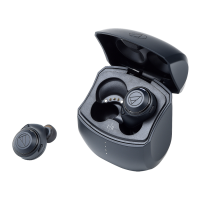


 To Next Page