Need help?
Do you have a question about the Audiolab DSP-4800 and is the answer not in the manual?
Details specifications for input, output, CMRR, frequency response, distortion, and gain.
Details settings for equalizer, filters, and limiter parameters.
Lists basic precautions for using electric products, including reading instructions and avoiding water.
Details safety instructions regarding polarized plugs, wiring, and electrical shock prevention.
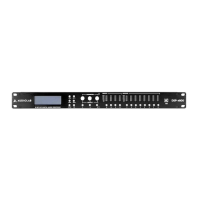
Describes the features and components of the front panel, including LCD, buttons, and LED meters.
Details rear panel components: power, ventilation, LAN, and input/output connectors.
Explains how to set input parameters: name, delay, polarity, gain, and EQ.
Details input gain adjustment and setting up to 8 parameter EQs per channel.
Explains how to adjust the noisegate parameter for each input channel.
Describes how to set a custom name for each output channel.
Explains selecting input sources and adjusting output gain for channels.
Details setting output polarity and delay in ms, meters, or feet.
Describes setting high-pass and low-pass filters for crossover, including frequency, type, and slope.
Explains how to set up to 6 parameter EQs per output channel, including PEQ, Lo-Shelf, and Hi-Shelf.
Details configuring limiter and compressor settings: threshold, attack, and release.
Covers loading, storing, erasing programs, and copying channels.
Details selecting input sources and setting passwords for security.
Covers backlight, system info, temperature, filter display, scene change, and WiFi reset.
Explains navigating the interface: data view, program, channel setup, copy, system, and connect options.
Covers input/output channel display, source selection, and basic settings.
Details COM port selection and network address settings for connecting to the device.
Instructions for loading, storing, reading, and recalling programs on the device and PC.
Covers LCD backlight, temperature, and product details display settings.
Details editing input parameters: mute, gain, phase, delay, EQ, and noisegate.
Details editing output parameters: source, mute, gain, phase, delay, EQ, crossover, and limiter.
Instructions for adjusting EQ and crossover parameters using icons on the curve display.
 General
| Type | Digital Signal Processor |
|---|---|
| Signal-to-Noise Ratio | >110dB |
| Bit Depth | 24-bit |
| Input Impedance | 10 kΩ |
| Frequency Response | 20 Hz - 20 kHz (±0.5 dB) |
| THD+N | <0.005% |
| Dynamic Range | >110 dB |
| EQ | Parametric |
| Crossover | Butterworth, Linkwitz-Riley, Bessel |
| Connectors | XLR |
| Control | RS-232, Ethernet |
| Outputs | 8 (Analog) |
| Digital Filter | FIR |
| Supported Sample Rates | 48 kHz, 96 kHz |

 To Next Page