EasyManua.ls Logo

Audiovox Sirius SIR-PNP3 - User Manual

Audiovox Sirius SIR-PNP3
32 pages
Print Icon
To Next Page IconTo Next Page
Loading...
128-7193A
1 of 32
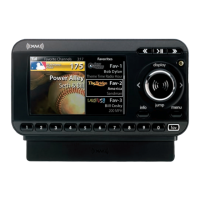
Shuttle User Guide SIR-PNP3
JUMP
s.seek
p
.tune
Category A-112:00P
Artist
Song
001 Channel Nam e
Released: 8-6-04
Revision A: 8-10-04 Removed maximum FM frequency reference; default display mode PDT to 2 lines
and font type to A.

Questions and Answers

  • J
    Joshua AyersJul 26, 2025
    What to do if there is no sound from my Audiovox Radio?
    • R
      Richard MontgomeryJul 26, 2025
      If you're not getting any sound from your Audiovox Radio, first, make sure the audio cables are properly connected to both the Shuttle and the radio. Second, try selecting a different FM modulator frequency.
  • J
    jenniferriveraAug 1, 2025
    What to do if my Audiovox Sirius SIR-PNP3 says 'Check antenna'?
    • C
      Courtney FreemanAug 1, 2025
      If your Audiovox Radio displays a 'Check Antenna' message, first ensure the satellite antenna is properly connected to the Shuttle. If the issue persists, the antenna or cable might be faulty, and you should contact your system installer or vendor.
  • L
    Lucas SchwartzAug 6, 2025
    How to fix Audiovox Radio shuttle if it does not turn on?
    • C
      Curtis TateAug 6, 2025
      If your Audiovox Radio's shuttle does not turn on, check the fuse and ensure the power cable is properly connected.
  • M
    marilyn93Aug 13, 2025
    Why is my Audiovox Radio having static or unclear audio?
    • S
      Steven LeeAug 13, 2025
      If you are experiencing audio static or a loss of clarity with your Audiovox Radio, try switching to another FM frequency. Also, check that the vehicle antenna is securely connected to the radio.
  • K
    kobrienAug 19, 2025
    What to do if my Audiovox Sirius SIR-PNP3 Radio shows no signal on the Shuttle display?
    • M
      Michelle WrightAug 19, 2025
      If there is no signal on your Audiovox Radio's Shuttle display, check the surroundings of the antenna for any obstacles. Try changing the location to remove any obstructions like bridges.

Summary

Safety and System Overview

Cautions and Warnings

Important safety guidelines and precautions for installing and operating the unit.

Shuttle System Components

Identifies the main physical parts and accessories of the Audiovox Shuttle receiver system.

Sirius Shuttle Controls

Primary Controls

Details functions of Power, Encoder Knob, Select Button, and Menu Button for core operation.

Channel Selection and Tuning

Covers direct tuning, category tuning, presets, and content listing options.

Memory and Special Function Buttons

Explains Memory, Display, Band, Keypad, and Jump buttons for features and access.

Menu Configuration

Jump Settings and FM Transmitter

Configures Jump button for alerts and selects FM transmitter frequency.

Display, Channel Management, and Locking

Adjusts display, manages channels (add/skip), and locks channels.

System Preferences and Time Features

Configures audio levels, antenna aiming, memory, and time-based functions.

Factory Default Reset

Restores the unit to its original factory settings.

Remote Control Unit

Troubleshooting and Specifications

Troubleshooting Guide

Provides solutions for common faults and issues encountered with the unit.

Specifications

Technical details like audio output, power supply, and physical dimensions.

Appendices and Warranty

Appendix A: City Names & Abbreviations

Lists city names and their corresponding 3-letter abbreviations for traffic reports.

12 Month Limited Warranty

Outlines the terms and conditions of the product warranty.

Audiovox Sirius SIR-PNP3 Specifications

General IconGeneral
BrandAudiovox
ModelSirius SIR-PNP3
CategoryRadio
LanguageEnglish

Related product manuals