EasyManua.ls Logo

August View - User Manual

August View
45 pages
Print Icon
To Next Page IconTo Next Page
Loading...
EN
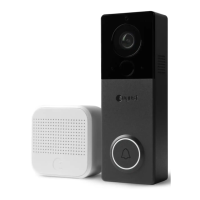
August View Doorbell Cam
Installation Guide and User Manual
Question and Answer IconNeed help?

Do you have a question about the August View and is the answer not in the manual?

Summary

Inside the box

Get to know your August View

Get to know your August Views Accessories

Before You Begin

Set up in the August app first

Initial setup and configuration of the doorbell via the August mobile application.

Position the camera where you want it on the wall

Guidance on optimal placement and viewing angle testing for the doorbell camera.

Determine Drill Bit Size

Installation Using the Wedge

Marking and Plate Removal

Marking the installation location and detaching the mounting plate from the doorbell.

Marking and Drilling Holes

Securing Wedge and Mounting Plate

Final Doorbell Attachment

Installation Without the Wedge

Marking Location and Plate Removal

Marking the installation site and detaching the mounting plate from the doorbell.

Marking and Drilling Holes

Securing Mounting Plate and Doorbell

Optional Retaining Screws

Using Your August View Doorbell Cam

Battery Information and Safety

Battery Changing Instructions

Step-by-step guide to safely remove, charge, and replace the device's battery.

Regulatory Compliance

FCC Compliance and Radiation Statement

FCC compliance, interference notices, and radiation exposure guidelines.

Help and Support

Get to Know Your August Chime

Chime Setup and Installation

Install the Doorbell

Requirement for a compatible August Doorbell Cam installation before Chime setup.

Plug Into Power

Instructions for plugging the August Chime into a working AC power outlet.

Set up in the August app

Guidance for downloading the August Home app and following in-app setup.

Adjust Settings

Customizing Chime name, sound, volume, and LED flashing via the August app.

Chime Product and Device Information

Chime FCC and Regulatory Compliance

Chime Help and Support

Summary

Inside the box

Get to know your August View

Get to know your August Views Accessories

Before You Begin

Set up in the August app first

Initial setup and configuration of the doorbell via the August mobile application.

Position the camera where you want it on the wall

Guidance on optimal placement and viewing angle testing for the doorbell camera.

Determine Drill Bit Size

Installation Using the Wedge

Marking and Plate Removal

Marking the installation location and detaching the mounting plate from the doorbell.

Marking and Drilling Holes

Securing Wedge and Mounting Plate

Final Doorbell Attachment

Installation Without the Wedge

Marking Location and Plate Removal

Marking the installation site and detaching the mounting plate from the doorbell.

Marking and Drilling Holes

Securing Mounting Plate and Doorbell

Optional Retaining Screws

Using Your August View Doorbell Cam

Battery Information and Safety

Battery Changing Instructions

Step-by-step guide to safely remove, charge, and replace the device's battery.

Regulatory Compliance

FCC Compliance and Radiation Statement

FCC compliance, interference notices, and radiation exposure guidelines.

Help and Support

Get to Know Your August Chime

Chime Setup and Installation

Install the Doorbell

Requirement for a compatible August Doorbell Cam installation before Chime setup.

Plug Into Power

Instructions for plugging the August Chime into a working AC power outlet.

Set up in the August app

Guidance for downloading the August Home app and following in-app setup.

Adjust Settings

Customizing Chime name, sound, volume, and LED flashing via the August app.

Chime Product and Device Information

Chime FCC and Regulatory Compliance

Chime Help and Support

August View Specifications

General IconGeneral
ConnectivityWi-Fi (2.4GHz)
Night VisionYes
Two-Way AudioYes
Field of View120 degrees
Power SourceWired
CompatibilityiOS, Android
Operating Temperature-4°F to 122°F (-20°C to 50°C)
FeaturesMotion Detection, Two-Way Talk

Related product manuals