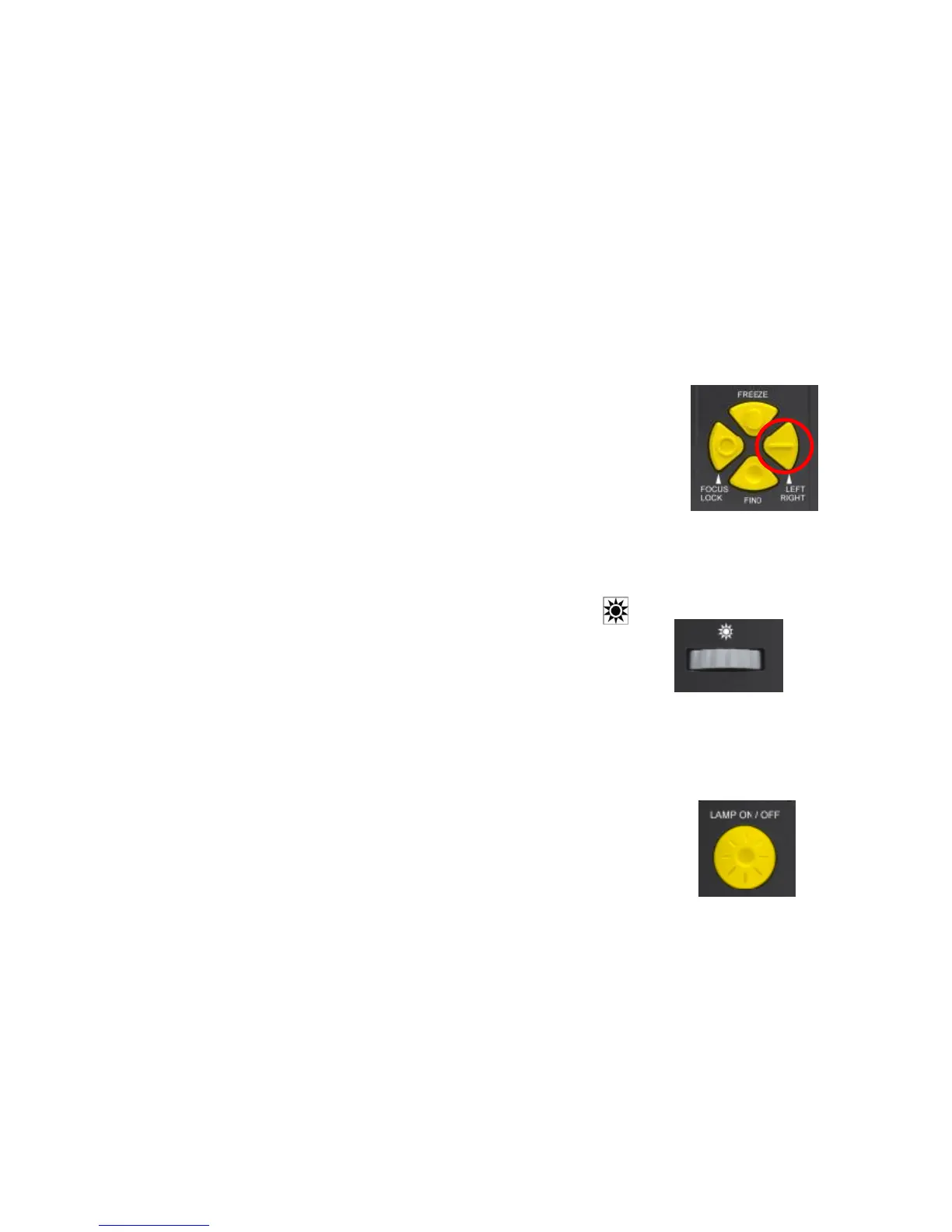
circular ring, as shown in the figure on the right. When the machine is
first turned on, the camera will be in auto focus. Press the “Focus Lock”
button to stop the auto focus. The words “Focus Lock” will display on the
upper left corner of the screen. Press the “Focus Lock” button again to
allow the machine to auto focus. The words, "Focus Lock" will disappear
from the upper left corner of the screen.
7) Left/Right Handed Toggle
The "Left/Right" button is indicated by the marking of a raised horizontal
line, as shown in the figure on the right. If the image observed through
the camera appears to be laterally inverted (or reversed), press this
button to adjust the current image to the correct position.
8) Light/Contrast Adjustment
The “Light/Contrast” adjustment is indicated by the symbol, " ,” as
shown in the figure. By rotating the "Light/Contrast" wheel, you can get
images of higher resolution and higher contrast.
9) LED Lamp On/Off Switch
The "Lamp On/Off" switch is as shown in the figure on the right. It is used to
turn the LED (Light Emitting Diode) lamp on and off.
Note: When the machine is turned on, the LED lamp will also turn on.


 To Next Page