24
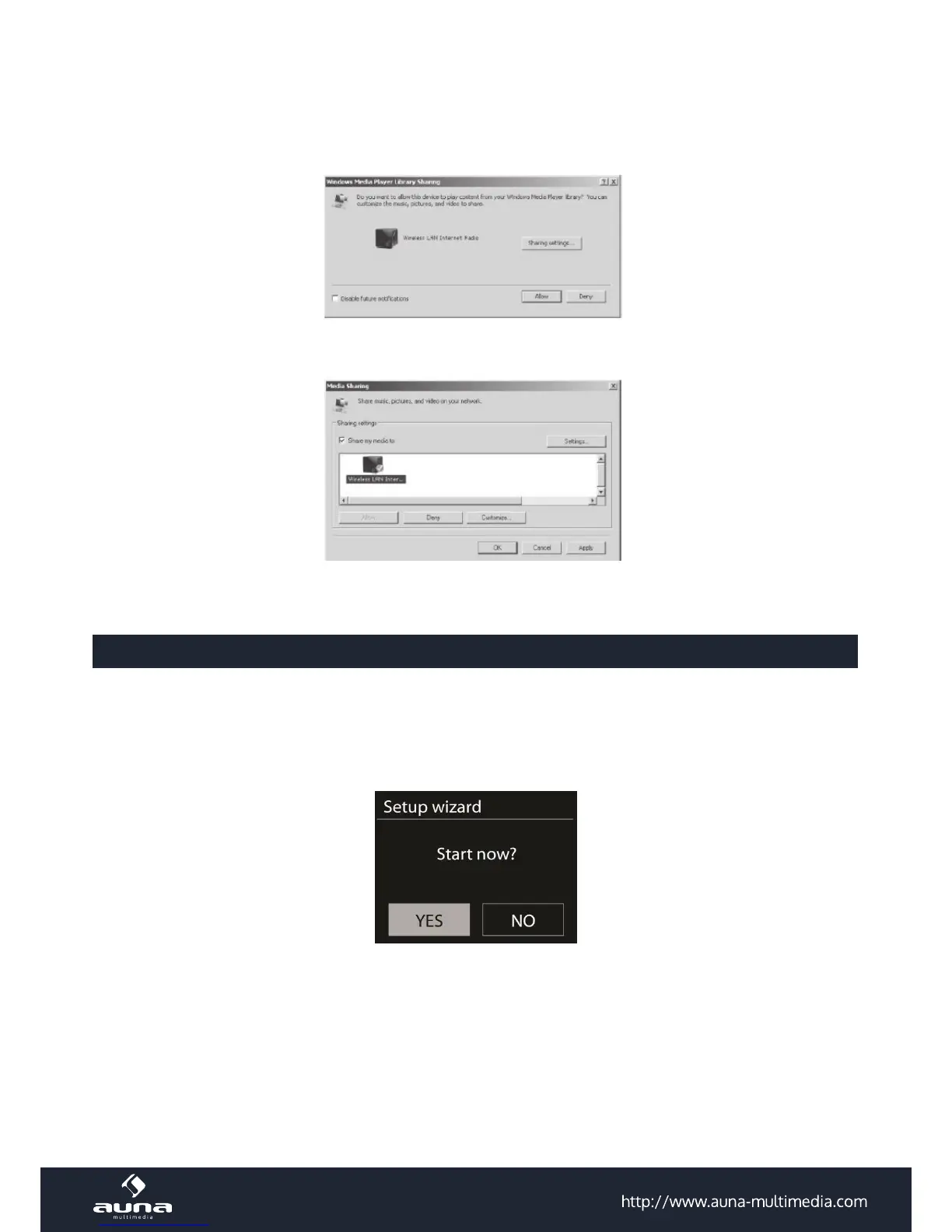
Music Sharing from PC
• To share the music les from PC, the following steps are done on the PC:
• Connect the PC to the network. Ensure that unit is powered on and connected to the same network.
• Open the UPnP platform Windows Media Player (11 or later). Alternatively, other platforms or servers such as
Windows Media Connection can be used.
• Allow to share your media to Wireless LAN Internet Radio, which is the device name for music streaming. Add the
audio les and folders you want to share to the media library.
Settings
In the main menu, you can select the following modes: Internet Radio, Media Player, DAB, FM, AUX IN, Sleep; Alarm
and System Settings.
System Settings
Setup Wizard
Time/date
Display format: Select 12or 24 as the time format.
Auto-update
The time and date can be updated manually or automatically from DAB, FM or network.
Auto-update works with data sent over DAB, FM or the Internet. The clock is only updated when in a corresponding
mode, so it is best to select a mode you use regularly.
DAB and FM use time signals broadcast with radio transmissions. Network uses a time signal sent from the Internet








 To Next Page