17
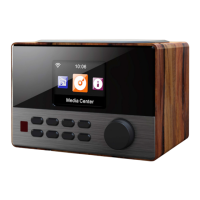
IR Sensor 1 9 FORWARD
STANDBY / ON 2 10
VOL/NAV/OK: rotate = VOL/scroll
press = select
SLEEP 3 11 Display
MODE 4 12 POWER
ALARM 5 13 DC-IN
PRESET 6 14 Line-Out (3.5mm)
BACK 7 15 AUX-In (3.5mm)
MENU (enter menu for current mode) 8 16 USB socket
Remote Control:
• Insert two batteries (type AAA) into the battery compartment of the remote control, minding the cor-
rect polarity as indicated inside the battery compartment.
Standby/on 1 12 Mute on/o
Dimmer (Display) 2 13 Sleep timer
Language 3 14 Alarm settings
MODE 4 15 Main menu
Up 5 16 OK
Left/back 6 17 Right
Down 7 18 STOP
Play/Pause 8 19 Skip track
Previous track 9 20 Favorite stations
EQ presets 10 21 Show presets
VOL+/- 11 22 Num buttons










 To Next Page