EasyManua.ls Logo

auna iTuner 320 - Troubleshooting

auna iTuner 320
Print Icon
To Next Page IconTo Next Page
To Previous Page IconTo Previous Page
Loading...
84
EN
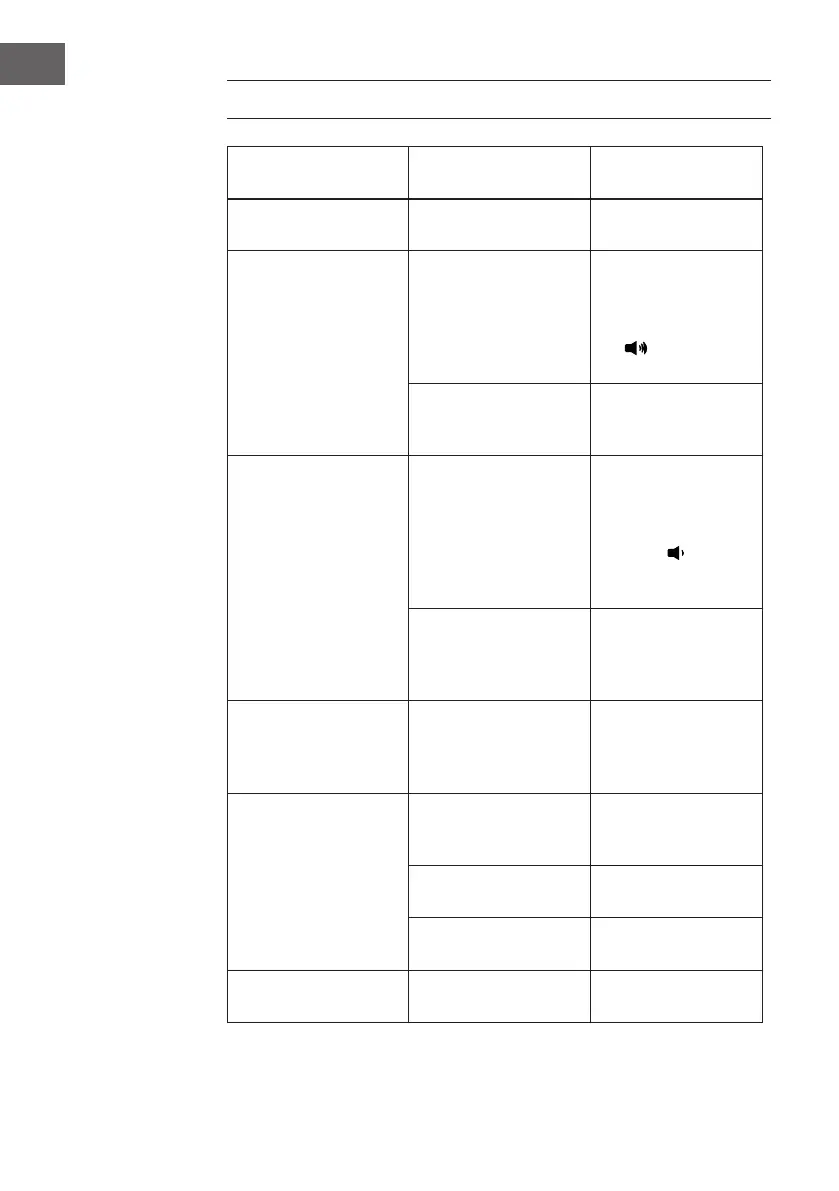
TROUBLESHOOTING
SYMPTOM POSSIBLE CAUSE
POSSIBLE
SOLUTION
Can’t power on
The Adapter is not
properly connected
Plug the Adapter
rmly
No sound or sound
weak
Volume level in
minimum position
Rise the volume
level by scrolling
the volume knob
clockwise or press
the button on
remote control
Volume level of
paired/connected
device is in low level
Rise the volume
level of the paired/
connected device
Sound distortion
Volume level too high
Reduce volume
level by scrolling
the volume knob
counterclockwise or
press the
button on remote
control.
Volume level of the
connected/paired
device too high
Reduce the volume
level of the
connected/paired
device
Weak Radio
Reception
Extend the telescopic
antenna,or relocate
the unit to get better
reception.
Wi-Fi not functioning
The unit had NOT add
in the Wi-Fi network
Keep the unit
connecting to Wi-Fi
network
The router wasin
power o mode
Power on your Wi-Fi
router
The W-LAN Antenna is
not installed
Install W-LAN
Antenna properly
No network
The LAN is not
connected
Connect the LAN port
to network

Related product manuals