Need help?
Do you have a question about the Aura BS20 and is the answer not in the manual?
Download the Fitdays App from the Apple Store or Google Play.
Prepare the scale by removing battery cover plastic and placing it on a flat surface.
Measure with bare feet, ensure full sensor contact, and maintain correct posture for accuracy.
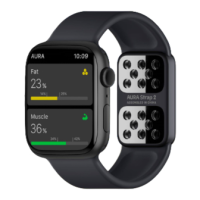
Aura Scale uses BIA technology to measure various body composition metrics.
Crucial warnings include not using with pacemakers, avoiding overload, and not immersing in water.
Explains symbols like 'Lo' (recharge) and 'Err' (overload or error) displayed on the scale.
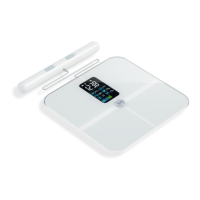
Identifies key physical components of the scale, including sensors, power button, and hand bar.
Scan QR code or download from app stores to install the Fitdays app on your device.
Register account via email or social media, then enter personal data for accurate measurements.
Ensure Bluetooth is on and authorized for the app to connect to the scale.
Step on the scale with one foot to activate, then pair via Bluetooth for data syncing.
The app displays your body composition data within seconds after measurement.
Steps to reset scale, Bluetooth, and re-pair the device if connection fails.
Addresses problems with body fat, weight, or muscle/fat ratio display not showing correctly.
Instructions on how to reset the scale by stepping on it to turn it on and calibrate.
Troubleshooting steps if the scale does not turn on, checking battery status.
Covers topics like achieving accurate results and changing app settings.
Explains the benefits of tracking total body composition beyond just weight for health.
Details segmental body fat analysis and muscle balance across body limbs.
Defines body fat percentage and provides healthy ranges based on age and gender.
Explains normal body water ranges and methods to increase it.
Describes how body age is calculated and provides tips on how to reduce it.
Explains the BMI formula, its meaning, and tips on how to lower it.
Defines muscle mass, its benefits, and normal ranges for men and women.
Highlights the importance of tracking bone mass over time for long-term health.
Explains visceral fat, its link to diseases, and how to reduce it.
Describes subcutaneous fat, its location, and its inclusion in body fat percentage.
Explains skeletal muscle, its role, and how to increase its mass.
Information provided is not medical advice; consult a professional for health concerns.
A section provided for users to write personal notes or observations.
The Aura Full Body Analysis Scale is a smart scale designed to provide comprehensive body composition analysis using bio-electrical impedance analysis (BIA) technology. It measures various body metrics beyond just weight, including body balance, body fat rate, visceral fat, body water, skeletal muscle rate, muscle mass, bone mass, protein, BMR (Basal Metabolic Rate), and body age.
To use the scale, first, download the "Fitdays" app from the Apple App Store or Google Play. After installing the app on your device, register an account using your email or a social media account, and then add your personal data, confirming it in the app.
Before taking a measurement, ensure the scale is placed on a hard, flat surface. Remove the plastic sheet from the battery cover if it's new. Open the Fitdays app and ensure Bluetooth is enabled on your device, along with Bluetooth Authorization, GPS, and Location services (for Android). The app will connect to the scale automatically when it's on its main screen and the scale is activated. To activate the scale, step on it with a single foot until "0.0lb" is displayed.
For accurate measurements, stand on the scale barefoot, making full contact with the sensors. Your arms should be held straight at a 45-degree angle, not straight down or close to your waist. Ensure all fingers line up with the electrode pad on the measuring hand bar, and your thumbs are not too close to each other. The app will display your body data within a few seconds after a full reading, which takes about 20-30 seconds. You can also manually pair the scale by clicking "Device" in the app and searching for the Bluetooth ID "Aura Curve."
The scale features an LED screen display that shows your weight and other metrics. It also provides indication symbols: "Lo" indicates the need to recharge the scale, "Err" signifies that the scale is overloaded (exceeding 440lb/180kg), and a bracket symbol [ indicates an error during reading, prompting you to step off, wait 5 seconds, and step on again.
For maintenance, the scale should be cleaned with a slightly damp cloth; do not immerse it in water or use chemical cleaning agents. To reset the scale, press the power button to turn it off, then turn it on again. If the scale doesn't turn on, check if the battery has run out and recharge it.
Troubleshooting common issues:
The Fitdays app allows you to change the language and measurement units (lb/kg/st) through the "Account" > "Settings" menu. For more information, you can check the FAQ section within the Fitdays app ("Account" > "Settings" > "FAQ").
Safety warnings:
The manual also provides detailed explanations of the various body metrics measured by the scale and how they relate to overall health, including Body Fat Rate, Body Water Rate, Body Age, Body Mass Index (BMI), Muscle Mass, Bone Mass, Visceral Fat, Subcutaneous Fat, and Skeletal Muscle. It emphasizes that maintaining a healthy body involves more than just weight, and tracking these compositions can help achieve a fit and healthy lifestyle.
 General
| Type | Sound Level Meter |
|---|---|
| Display | LCD |
| Resolution (dB) | 0.1 dB |
| Microphone | Electret Condenser Microphone |
| Weighting | A/C |
| Measurement Range (ppm) | Not Applicable |
| Accuracy (ppm) | Not Applicable |
| Resolution (ppm) | Not Applicable |
| Operating Temperature | 0°C to 40°C |
| Operating Humidity | 10% to 90% RH |
| Measuring Range (dB) | 30 dB to 130 dB |

 To Next Page