4
Open the package and make sure that inside are:
1. DSP processor - 1 pc.
2. Power connector - 1 pc.
3. Instruction.
4. Fasteners.
Package and installation
WARNING
DO NOT OPEN
1. Make sure your vehicle's onboard voltage is +12 volts.
2. Connect the +12V terminal to constant +12 volts.
4. Connect the REM terminal to the remote output of the head unit.
5. Connect the GND terminal to the metal part of the car body.
Note:
To avoid increased current consumption and unstable operation of the device, do not connect
the REM terminal to constant +12 volts!
Power connection
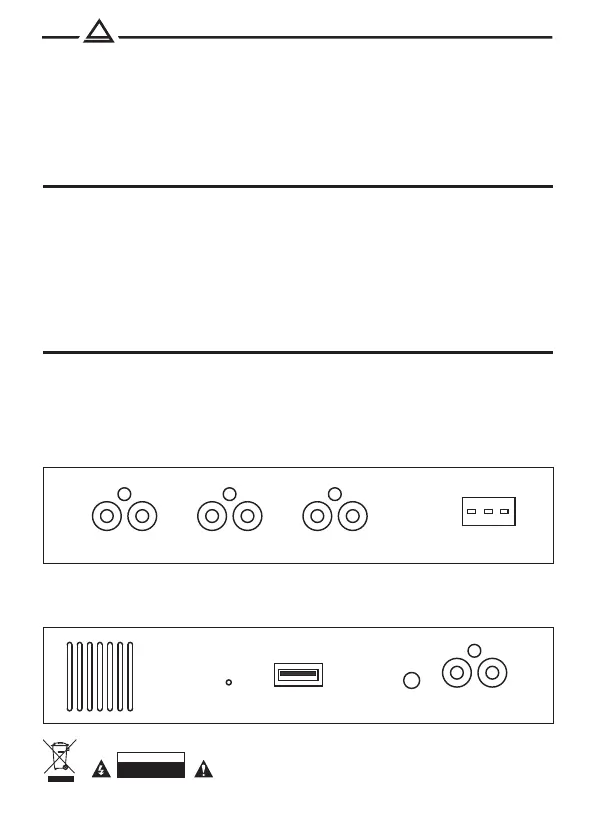
Режим 2 WAY (regular)
SUB - RCA subwoofer
FRONT-L - RCA front (left)
FRONT-R - RCA front (right)
REAR-L - RCA rear (left)
REAR-R - RCA rear (right)
Режим 3 WAY (network)
SUB - RCA subwoofer
FRONT-L - RCA MF speaker (left)
FRONT-R - RCA MF speaker (right)
REAR-L - RCA tweeter (left)
REAR-R - RCA tweeter (right)
Connecting RCA
L FRONT R L SUB RL REAR R
GND | REM | +12V
L IN RPOWERUSB
RST
L-IN - RCA-input (left)
R-IN - RCA-input (right)
USB - USB port
RST - reset, except sound


 To Next Page