12 13
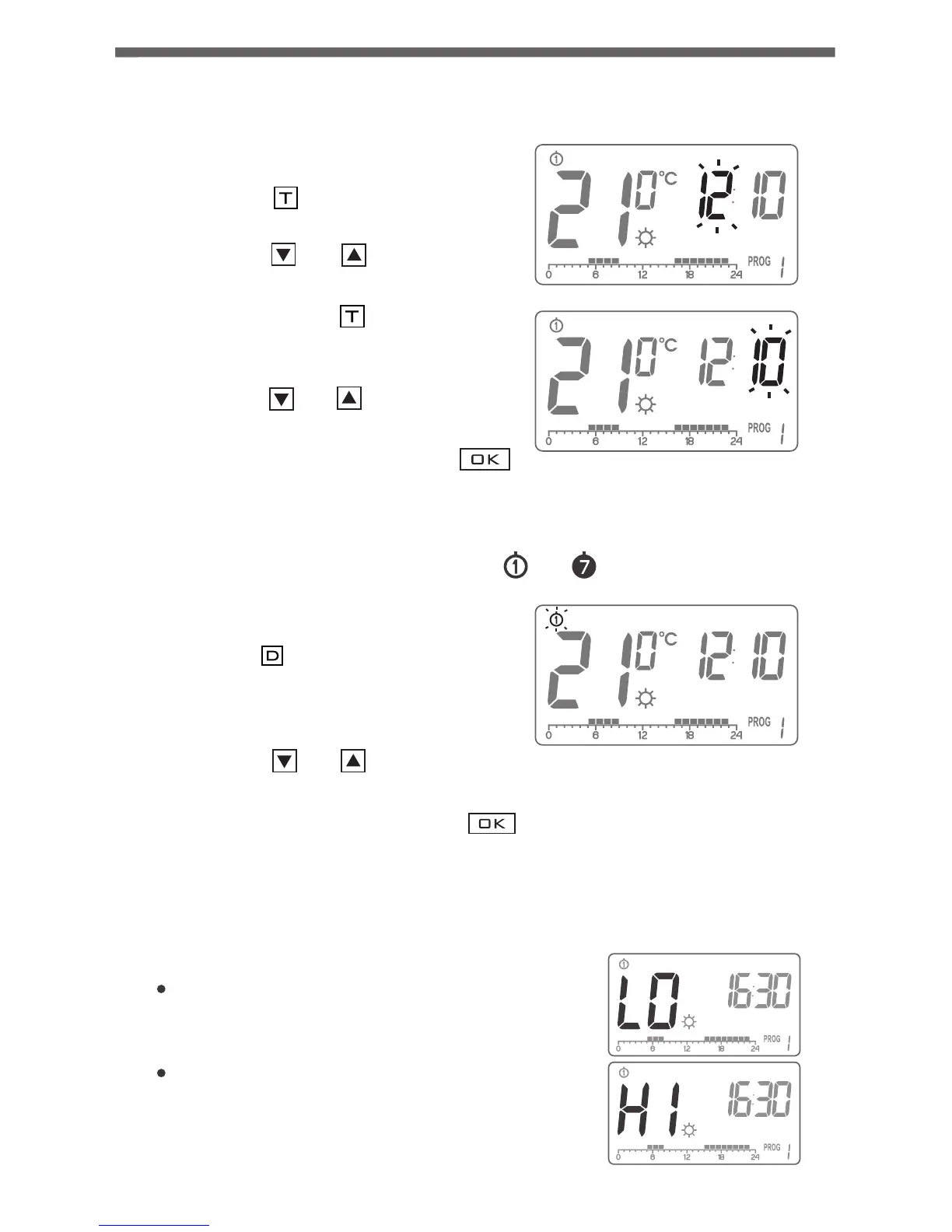
In order to set the day of week:
1. Press the button.
One of the digits representing days
of the week starts flashing, prompting
for setting it.
2. Using the and buttons, set the
desired day of week.
3. Confirm the setting with the
butto .
D
‚,,, .....
OK
Setting the clock
Setting the day of week
...
In order to set the clock:
1. Press the button. The hour field
starts flashing, prompting for setting it.
2. Using the and buttons, set the
desired hour value.
3. Then press the button again.
The minute field starts flashing,
prompting for setting it.
4. Using the and buttons, set the
desired minute value.
5. Confirm the setting with the
button.
T
‚,, ....
T
‚.. ...
Ok
LO, HI indicator
If measured temperature is lower than 5°C
LCD will display "LO".
If measured temperature is higher than 30°C LCD
will display "HI".
Starting-up the regulator for the first time
After the proper placement of batteries in
the battery holder, all segments of the LCD
display are displayed (display test) for one
second; during the next second, the
software version number is displayed.
Following that, the regulator enters time
setting mode; the hour field flashes,
prompting for setting it.
Using the and buttons, set the
desired hour value and confirm the setting
with the button.
The regulator switches to setting minutes.
Using the and buttons, set the
desired minute value and confirm the
setting with the button.
In the upper part of the display, the day of
the week symbol starts flashing. Using the
and buttons, set the desired day
of the week and confirm the setting
with the button.
The regulator enters its normal mode
of operation.
‚,, ,,,,
OK
,,,,‚ ,,,,
OK
,,,‚ ,,,,
OK
NOTE:
1) If no button is pressed in 60 seconds when setting the hour value for the
first time, the regulator will automatically enter its normal mode
of operation.
2) When programming any other functions, failing to press any buttons
in 10 seconds is equivalent to pressing the button .OK.


 To Next Page