WEEE NOTICE
The WEEE mark applies only to coun-
tries within the European Union (EU)
and Norway.
This appliance is labeled in accordance
with European Directive 2012/19/
EU concerning waste electrical and
electronic equipment (WEEE). The
Directive determines the framework
for the return and recycling of used
appliances as applicable throughout
the European Union. This label is
applied to various products to indicate
that the product is not to be thrown
away, but rather reclaimed upon end
of life per this Directive.
FCC NOTICE
This equipment has been tested and
found to comply with the limits for a
Class B digital device, pursuant to Part
15 of the Federal Communications
Commission (FCC) Rules. These limits
are designed to provide reasonable
protection against harmful interfe-
rence in a residential installation.
This equipment generates, uses,
and can radiate radio frequency
energy and, if not installed and used
in accordance with the instructions,
may cause harmful interference to
radio communications. However, there
is no guarantee that interference will
not occur in a particular installation.
If this equipment does cause harmful
interference to radio or television
reception, which can be determined
by turning the equipment o and on,
the user is encouraged to try to correct
the interference by one or more of the
following measures:
• Increase the separation between the
equipment and the receiver.
•Connect the equipment into an outlet
on a circuit dierent from that to
which the receiver is connected.
•Consult the dealer or an experienced
radio or television technician for help.
This device complies with part 15 of
the FCC Rules. Operation is subject to
the following two conditions: (1) This
device may not cause harmful interfe-
rence, and (2) this device must accept
any interference received, including
interference that may cause undesired
operation.
AURES TECHNICAL
SUPPORT WEBSITE
To download our most recent drivers
and utilities and obtain advice regar-
ding the installation of your equip-
ment, please visit the AURES Technical
Support Website :
www.aures-support.com
This equipment has been tested and
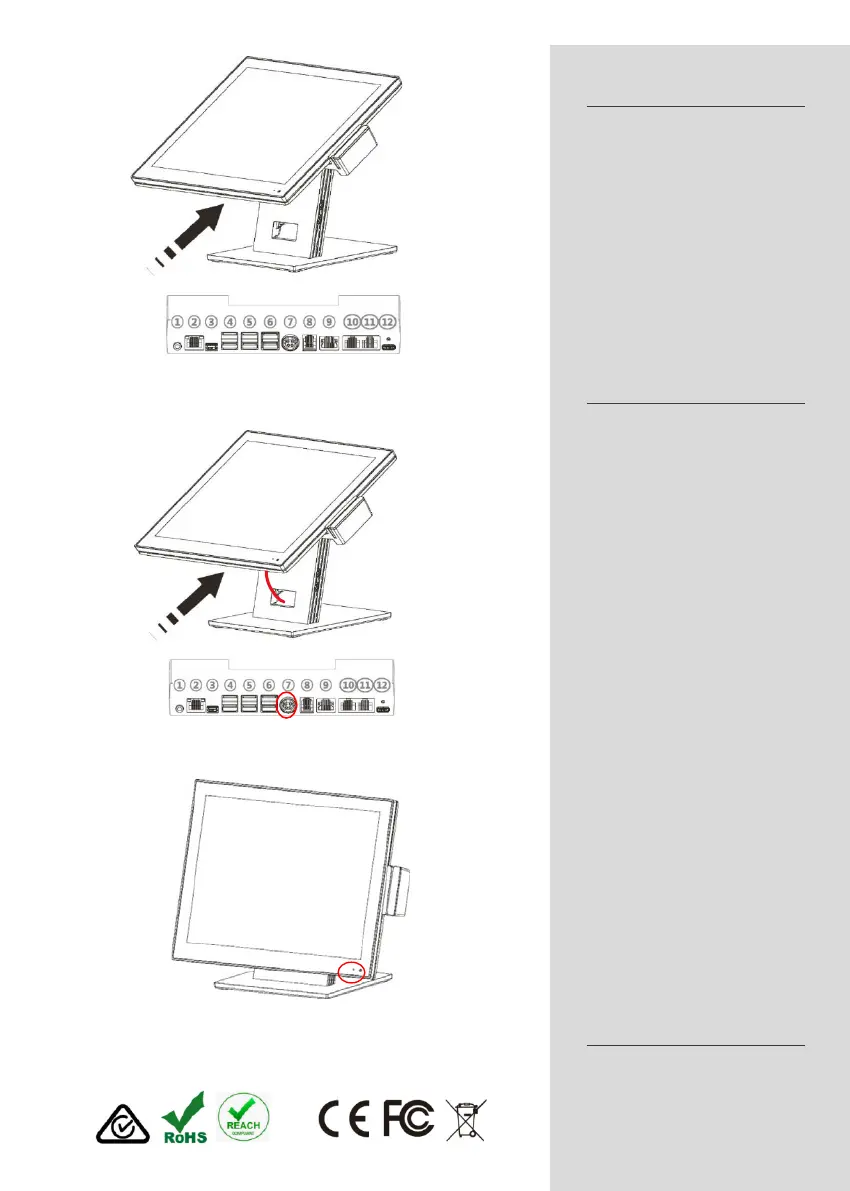
2)Connect all the cables to the relevant I/O
electrical Power Supply, remove
the power cable plug from the wall
socket. The wall socket must be easily
accessible and in close proximity to
the product.
Read these instructions carefully. Save
these instructions for future reference.
Follow all warnings and instructions
marked on the product.
Do not use this product near water.
Do not place this product on an unstable
cart, stand, or table. The product
may fall, causing serious damage to
the product.
Only use power supply unit and cables
released by AURES.
Do not allow anything to rest on the
power cord. Do not locate this product
where persons will walk on the cord.
Never spill liquid of any kind on the
product.
Ensure that the device connects to
a socket/outlet with ground/earth
connection.
WEEE NOTICE
The WEEE mark applies only to countries
within the European Union (EU)
and Norway.
This appliance is labeled in accordance
with European Directive 2012/19/
EU concerning waste electrical and
electronic equipment (WEEE). The
Directive determines the framework
for the return and recycling of used
appliances as applicable throughout
the European Union. This label is
applied to various products to indicate
that the product is not to be thrown
away, but rather reclaimed upon end
of life per this Directive.
CE NOTICE
This device complies with EMC
Directive 2014/30/EU and “Low
Voltage Directive” 2014/35/EU issued
by the Commission of the European
Community.
1)Screw-on the two screws at the bottom of
the stand (M6 x 12L)
3)Connect the PSU passing the cable
through the hole
found to comply with the limits for a
Class B digital device, pursuant to Part
15 of the Federal Communications
Commission (FCC) Rules. These limits
are designed to provide reasonable
protection against harmful interference
in a residential installation.
This equipment generates, uses,
and can radiate radio frequency
energy and, if not installed and used
in accordance with the instructions,
may cause harmful interference to
radio communications. However, there
is no guarantee that interference will
not occur in a particular installation.
If this equipment does cause harmful
interference to radio or television
reception, which can be determined
by turning the equipment off and on,
the user is encouraged to try to correct
the interference by one or more of the
following measures:
• Increase the separation between the
equipment and the receiver.
•Connect the equipment into an outlet
on a circuit different from that to
which the receiver is connected.
•Consult the dealer or an experienced
radio or television technician for help.
This device complies with part 15 of
the FCC Rules. Operation is subject to
the following two conditions: (1) This
device may not cause harmful interference,
and (2) this device must accept
any interference received, including
interference that may cause undesired
operation.
AURES TECHNICAL
SUPPORT WEBSITE
To download our most recent drivers
and utilities and obtain advice regarding
the installation of your equipment,
please visit the AURES Technical
Support Website :
www.aures-support.com
4)Turn on using the touch button
2. Connect all the cables to the relevant I/O
3. Connect the PSU passing the cable through the hole
3)Connect the PSU passing the cable
through the hole
found to comply with the limits for a
Class B digital device, pursuant to Part
15 of the Federal Communications
Commission (FCC) Rules. These limits
are designed to provide reasonable
protection against harmful interference
in a residential installation.
This equipment generates, uses,
and can radiate radio frequency
energy and, if not installed and used
in accordance with the instructions,
may cause harmful interference to
radio communications. However, there
is no guarantee that interference will
not occur in a particular installation.
If this equipment does cause harmful
interference to radio or television
reception, which can be determined
by turning the equipment off and on,
the user is encouraged to try to correct
the interference by one or more of the
following measures:
• Increase the separation between the
equipment and the receiver.
•Connect the equipment into an outlet
on a circuit different from that to
which the receiver is connected.
•Consult the dealer or an experienced
radio or television technician for help.
This device complies with part 15 of
the FCC Rules. Operation is subject to
the following two conditions: (1) This
device may not cause harmful interference,
and (2) this device must accept
any interference received, including
interference that may cause undesired
operation.
AURES TECHNICAL
SUPPORT WEBSITE
To download our most recent drivers
and utilities and obtain advice regarding
the installation of your equipment,
please visit the AURES Technical
Support Website :
www.aures-support.com
4)Turn on using the touch button
4. Turn on using the touch button. Press the button until the unit starts.


 To Next Page
 Loading...