24 US-EN
Press the SELECT button
23
to display the
maximum values of the indoor and out-
door temperature.
Press the SELECT button again to display
the minimum values of the indoor and
outdoor temperature.
Press the SET / RESET button
24
while the
maximum and minimum values are being
displayed to erase the memory.
Press the SELECT button to return to the
standard display.
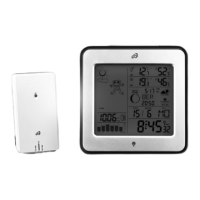
Displaying the
temperature trends
After successfully connecting with the outdoor
sensor, the temperature station can display
the temperature trend (outdoor)
8
and the
temperature trend (indoor)
15
.
You may see the following displays:
= The temperature is rising.
= The temperature is constant.
= The temperature is falling.
Battery indicator
The
11
and
14
symbols appear in
the temperature station’s LC display if the bat-
teries in the outdoor sensor or the tempera-
ture station are weak.
Replacing the batteries
Open the battery compartment
25
or
31
.
Remove the drained batteries.






 To Next Page